
Oscilloscopes are essential tools for engineers, hobbyists, and students who work with electronic signals. When you use an oscilloscope, two terms often appear: sample rate and frequency. At first, these may seem simple, but the relationship between them is critical for capturing and analyzing signals correctly. If you misunderstand this connection, your measurements may be inaccurate, or you might miss important details in your signals. This article explains the meaning of sample rate and frequency, explores how they interact, and gives practical advice for choosing the right settings. Even if you are new to oscilloscopes, you’ll find clear explanations, examples, and helpful tips that make these concepts easy to understand and apply.
What Is Oscilloscope Sample Rate?
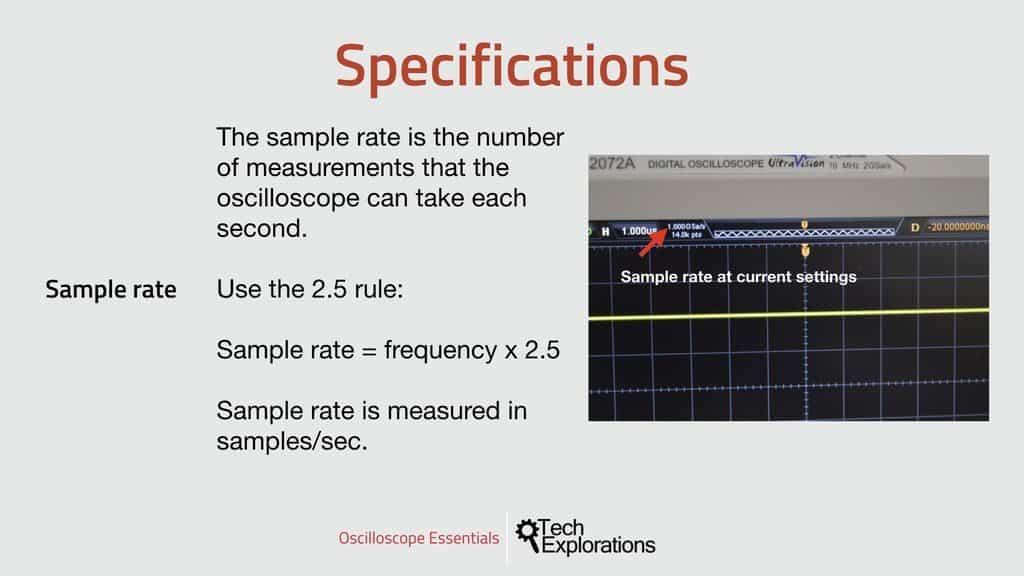
The sample rate is the number of times per second an oscilloscope records a value from an input signal. It’s measured in samples per second (S/s), often shown as MS/s (million samples per second) or GS/s (billion samples per second).
If your oscilloscope has a sample rate of 1 MS/s, it takes 1,000,000 samples every second. The sample rate determines how much detail you can see in a signal. Higher sample rates mean more points recorded and a clearer view of fast changes.
Why Sample Rate Matters
Imagine you’re watching a movie. If the movie shows only a few frames per second, it looks choppy. If it shows many frames, it looks smooth. The sample rate works similarly for electronic signals. If you sample too slowly, you miss important parts of the signal.
If you sample quickly, you capture the signal’s shape accurately.
Typical Sample Rates
Most modern oscilloscopes offer sample rates ranging from:
- Entry-level: 20 MS/s to 200 MS/s
- Mid-range: 500 MS/s to 2 GS/s
- High-end: 5 GS/s to 20 GS/s or more
Always check the oscilloscope’s specifications to see its maximum sample rate.
Understanding Signal Frequency
Frequency is how often a signal repeats each second. It’s measured in hertz (Hz). For example, a signal with a frequency of 1 kHz repeats 1,000 times every second.
In electronics, you may deal with frequencies from a few hertz (slow signals) to hundreds of megahertz (radio signals) or gigahertz (microwave signals). The frequency tells you how fast the signal changes.
Types Of Signals
- Low-frequency signals: Battery voltage, temperature sensors, audio signals (20 Hz to 20 kHz)
- Mid-frequency signals: Digital logic (1 kHz to 10 MHz)
- High-frequency signals: Radio, Wi-Fi, HDMI (10 MHz to several GHz)
Knowing your signal’s frequency helps you choose the right oscilloscope and settings.
Credit: www.allaboutcircuits.com
Sample Rate Vs Frequency: The Key Relationship
The sample rate vs frequency relationship is central to using oscilloscopes correctly. If your sample rate is too low compared to the signal frequency, you won’t capture the signal accurately. The main principle here is the Nyquist theorem.
Nyquist Theorem Explained
The Nyquist theorem states: To capture a signal without losing information, you must sample at least twice its highest frequency.
If your signal is 10 MHz, your sample rate must be at least 20 MS/s. If you sample slower, you risk aliasing.
Aliasing: What Can Go Wrong
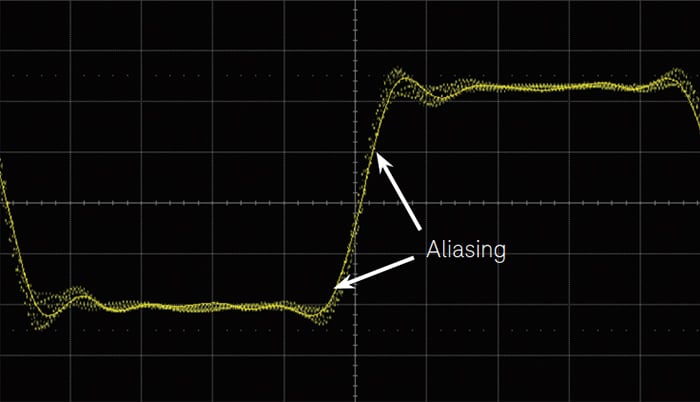
Aliasing happens when you sample a fast signal too slowly. The oscilloscope shows incorrect waveforms, often making them look slower or different than reality. You can miss spikes, glitches, or critical information.
For example: If you sample a 10 MHz signal at 10 MS/s, you may see a distorted or misleading shape.
Practical Minimum Sample Rate
Most experts recommend sampling at least 5 to 10 times the highest signal frequency for accurate results. This gives you enough points to see the real shape, not just the peaks and valleys.
Example Calculation
If you want to capture a 50 MHz signal:
- Minimum sample rate (Nyquist): 100 MS/s
- Recommended for accuracy: 250 MS/s to 500 MS/s
Comparing Sample Rate And Frequency: Real-world Scenarios
Let’s look at how sample rate and frequency interact in practical situations. These examples show why sample rate matters and how to avoid common mistakes.
Capturing A Square Wave
Square waves are common in digital circuits. They have sharp edges that are hard to capture.
- Frequency: 1 MHz
- Recommended sample rate: 10 MS/s to 20 MS/s
If you use only 2 MS/s (Nyquist minimum), you see the general shape but miss the sharp transitions. At 20 MS/s, you see the edges clearly.
Measuring A Fast Pulse
Some signals have brief pulses—important for communication or radar.
- Pulse width: 10 ns (nanoseconds)
- Frequency: 10 MHz
To capture this pulse, you need a sample rate high enough to get several points within 10 ns. At 1 GS/s, you get 1 sample every nanosecond, so you capture the pulse in detail.
Multi-frequency Signals
Real signals often contain many frequencies. For example, music or digital data.
- Highest frequency: 5 MHz
- Sample rate: At least 50 MS/s
Sampling slower than this risks missing important details, especially the highest-frequency parts.
Credit: techexplorations.com
Data Table: Sample Rate Required For Common Frequencies
To make it easier, here’s a comparison of typical signal frequencies and recommended sample rates:
| Signal Frequency | Minimum Sample Rate (Nyquist) | Recommended Sample Rate | Application Example |
|---|---|---|---|
| 1 kHz | 2 kS/s | 10 kS/s | Audio signals |
| 100 kHz | 200 kS/s | 1 MS/s | Analog sensors |
| 10 MHz | 20 MS/s | 100 MS/s | Digital logic |
| 100 MHz | 200 MS/s | 500 MS/s | RF circuits |
| 1 GHz | 2 GS/s | 5 GS/s | Microwave signals |
Oscilloscope Sample Rate Limitations
While high sample rates are desirable, real-world oscilloscopes have limitations:
- Memory depth: High sample rates fill memory quickly. If you record for a long time, you may run out of storage.
- Cost: Oscilloscopes with very high sample rates are more expensive.
- Bandwidth: The oscilloscope’s bandwidth sets the highest frequency it can measure accurately, regardless of sample rate.
Memory Depth Vs Sample Rate
Here’s a quick comparison showing how memory depth and sample rate affect recording time:
| Memory Depth | Sample Rate | Maximum Recording Time |
|---|---|---|
| 1 Mpts | 1 MS/s | 1 second |
| 1 Mpts | 10 MS/s | 0.1 second |
| 10 Mpts | 10 MS/s | 1 second |
| 10 Mpts | 100 MS/s | 0.1 second |
For long recordings, you may need to reduce the sample rate or buy an oscilloscope with more memory.

Credit: www.youtube.com
How To Choose The Right Sample Rate
Choosing the correct sample rate for your oscilloscope isn’t just about following the Nyquist rule. You must consider the signal’s complexity, the details you need, and your oscilloscope’s capabilities.
Step-by-step Guide
- Identify the highest frequency in your signal, including possible spikes or harmonics.
- Multiply that frequency by 5–10 to find your recommended sample rate.
- Check the oscilloscope’s bandwidth, which should be higher than your signal’s highest frequency.
- Consider memory depth if you need long recordings.
- Test with your signal: If the waveform looks choppy or distorted, increase the sample rate.
Common Mistakes
- Sampling too slowly: Causes aliasing and wrong measurements.
- Ignoring bandwidth: Even with a high sample rate, poor bandwidth limits accuracy.
- Overestimating needs: Using a very high sample rate when not necessary wastes memory.
- Missing harmonics: Only measuring the main frequency, not spikes or noise.
Data Table: Oscilloscope Specs Comparison
Here’s how different oscilloscopes compare in sample rate and frequency handling:
| Oscilloscope Model | Bandwidth | Max Sample Rate | Recommended Max Signal Frequency |
|---|---|---|---|
| Basic (e.g., Rigol DS1054Z) | 50 MHz | 1 GS/s | 10 MHz |
| Mid-range (e.g., Tektronix MDO3014) | 100 MHz | 2.5 GS/s | 20 MHz |
| High-end (e.g., Keysight InfiniVision) | 1 GHz | 10 GS/s | 200 MHz |
Notice that the recommended max signal frequency is lower than the oscilloscope’s bandwidth or sample rate for reliable measurements.
Advanced Insights: What Beginners Often Miss
Many beginners focus only on the basic Nyquist rule. But two important points are often overlooked:
- Edge detection: For signals with fast edges (like digital pulses), you need a higher sample rate, sometimes 10–20 times the frequency, to see the transition clearly.
- Envelope and harmonics: Real-world signals include harmonics (extra frequencies from distortion or noise). If you only sample for the main frequency, you may miss these details.
By considering these factors, you’ll capture more accurate and useful data.
Practical Tips For Better Oscilloscope Use
- Always check both sample rate and bandwidth before measuring new signals.
- Use a higher sample rate for signals with sharp transitions or complex waveforms.
- Adjust memory depth if you need to record for longer periods.
- Review captured waveforms for aliasing or missing features—if in doubt, increase the sample rate.
- Try capturing a signal at different sample rates to see how the waveform changes and learn what settings are best.
For a deeper technical dive, you can find more information at Wikipedia.
Frequently Asked Questions
What Happens If My Oscilloscope Sample Rate Is Too Low For My Signal Frequency?
If the sample rate is too low, you risk aliasing, which means the oscilloscope shows an incorrect waveform. You may miss spikes, glitches, or the real shape of your signal. Always sample at least twice the highest frequency, but 5–10 times is safer.
Is Higher Sample Rate Always Better?
Not always. While higher sample rates give more detail, they use more memory and may be unnecessary for slow or simple signals. Balance sample rate with signal complexity and your oscilloscope’s memory capacity.
How Does Oscilloscope Bandwidth Relate To Sample Rate?
Bandwidth is the highest frequency your oscilloscope can measure accurately. Even if your sample rate is high, poor bandwidth limits signal fidelity. Choose an oscilloscope with bandwidth at least equal to your signal’s highest frequency.
Can I Measure Multiple Frequencies At Once?
Yes, but you must set your sample rate based on the highest frequency present. If your signal contains harmonics or noise, use a higher sample rate to ensure all components are captured.
What Is The Difference Between Real-time And Equivalent-time Sampling?
Real-time sampling captures signals as they happen, using the oscilloscope’s full sample rate. Equivalent-time sampling reconstructs repetitive signals over many cycles, allowing measurement of very high frequencies with a lower sample rate. Equivalent-time is not suitable for one-time or random signals.
Oscilloscope sample rate and frequency are tightly linked. Understanding their relationship helps you make accurate, reliable measurements. By following the tips and insights here, you’ll avoid common mistakes, capture better data, and get more value from your oscilloscope. Whether you’re troubleshooting circuits or learning electronics, mastering sample rate vs frequency will improve your results and confidence.