Are you looking to measure electrical current quickly and safely? A clamp multimeter is the perfect tool for the job.
But if you’re unsure how to use it, you might miss out on its full potential—or worse, risk injury. In this guide, you’ll learn simple, step-by-step instructions to use a clamp multimeter like a pro. By the end, you’ll feel confident handling electrical tasks with ease and accuracy.
Ready to unlock this handy skill? Let’s dive in.
Choosing The Right Clamp Multimeter
Choosing the right clamp multimeter is important for accurate and safe measurements. Not all clamp meters fit every task. Picking the best one saves time and prevents mistakes.
Types Of Clamp Meters
There are basic and advanced clamp meters. Basic models measure current only. Advanced ones measure voltage, resistance, and more. Some clamp meters have digital displays. Others show results on analog dials. Choose based on what you need to test.
Key Features To Consider
Look for features like auto-ranging and data hold. Auto-ranging adjusts the scale automatically. Data hold freezes the reading on the screen. A backlit display helps in dark places. Also, check the jaw size. It should fit the wires you test.
Safety Ratings And Standards
Safety ratings protect you from electric shocks. Check for CAT ratings like CAT II, CAT III, or CAT IV. Higher CAT numbers mean better protection. Look for meters that meet IEC or UL standards. These ensure the meter is tested and safe to use.
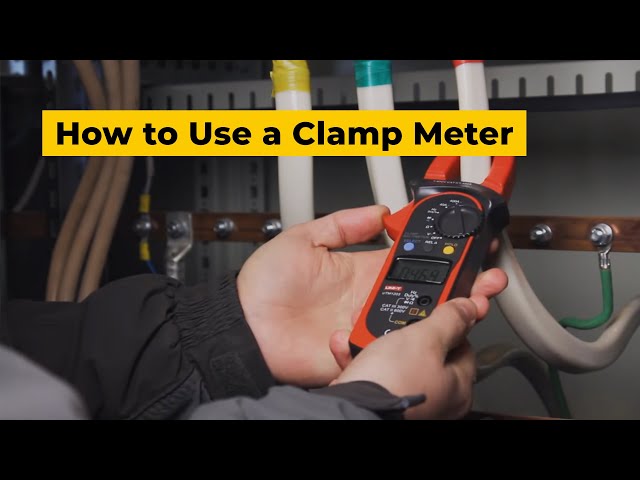
Credit: www.youtube.com
Preparing For Electrical Testing
Preparing for electrical testing is the first step in using a clamp multimeter safely and effectively. This stage sets the foundation for accurate measurements and protects you from electrical hazards. Proper preparation helps avoid mistakes and saves time during testing.
Gathering Necessary Tools
Start by collecting all tools needed for testing. You will need the clamp multimeter, test leads, and insulated gloves. A screwdriver might be useful to access electrical panels. Keep a flashlight handy for dark spaces. Having everything ready prevents interruptions during work.
Safety Precautions
Safety comes first in any electrical task. Always wear insulated gloves to protect against shocks. Make sure your clothes are dry and avoid wearing metal jewelry. Turn off power to the circuit before connecting the multimeter. Stand on a dry, non-conductive surface to stay safe.
Inspecting The Multimeter
Check the clamp multimeter before use. Look for any cracks or damage on the body and clamp. Inspect the test leads for frayed wires or loose connections. Replace damaged parts immediately. Test the multimeter on a known power source to ensure it works correctly.
Basic Operations Of A Clamp Multimeter
Understanding the basic operations of a clamp multimeter is essential for safe and accurate measurements. This tool measures electrical current without direct contact. It is easy to use once you know the steps. Learning the basic functions helps you work efficiently and avoid errors.
Powering On And Setup
Start by pressing the power button. Wait for the display to light up. Check the battery level before use. Place the multimeter on a flat surface. Make sure the jaws of the clamp are clean and free from dirt. Setting up correctly ensures precise readings.
Selecting Measurement Modes
Turn the dial to choose the mode you need. Options include voltage, current, and resistance. Each mode measures different electrical properties. Use the manual or auto mode for convenience. Selecting the right mode avoids damage to the device.
Using The Clamp Function
Open the jaws by pressing the clamp lever. Place the clamp around a single wire or conductor. Avoid clamping multiple wires together. The multimeter shows the current flowing through the wire. Release the lever carefully after measuring. This method keeps you safe from electric shocks.
Measuring Current With A Clamp Meter
Measuring current with a clamp meter is simple and safe. This tool lets you check electrical current without cutting wires. Just clamp it around a single conductor. The meter reads the magnetic field created by the current.
This method works for both AC and DC currents. Each type needs a slightly different approach. Understanding how to measure each current helps you use the clamp meter correctly. It also improves your measurement accuracy.
Ac Current Measurement
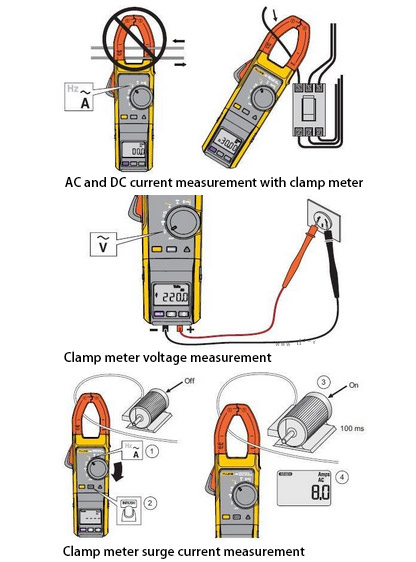
To measure AC current, open the clamp jaws. Place them around one wire only. Make sure no other wires are inside the clamp. Turn the meter on and set it to AC current mode.
The clamp meter senses the magnetic field from the AC current. It shows the value on the display. Keep the clamp steady for a clear reading. Avoid moving the wire or clamp during measurement.
Dc Current Measurement
DC current measurement requires a clamp meter with special sensors. These sensors detect direct current flow. Place the clamp around the wire as with AC. Select the DC current mode on the meter.
Hold the clamp still until the reading stabilizes. DC current readings may take a moment to appear. Ensure the clamp fully closes to get correct values. Use this method for batteries and solar panels.
Tips For Accurate Readings
Always clamp around one conductor at a time. Multiple wires cause mixed signals and wrong readings. Keep the clamp jaws clean and free from debris. Dirty jaws reduce the sensor’s accuracy.
Hold the clamp steady during measurement. Avoid twisting or shaking the wire. Check the meter’s battery level before use. Low battery can cause incorrect results.
Use the correct current mode, AC or DC. Confirm the meter’s range suits the expected current. If unsure, start with the highest range then lower it. Proper setup ensures reliable and safe measurements.
Measuring Voltage And Resistance
Measuring voltage and resistance with a clamp multimeter is simple and useful. These measurements help find electrical problems fast. Knowing how to check voltage and resistance saves time and keeps you safe. This guide shows easy steps to measure both accurately.
Voltage Testing Techniques
Start by setting the multimeter to the voltage mode. Use the right range for the expected voltage. Connect the probes to the circuit or device terminals. Hold the black probe on the ground or neutral point. Touch the red probe to the point where you want to measure voltage. Read the value on the screen carefully. Avoid touching the metal parts of the probes while testing.
Checking Resistance
Turn off power to the circuit before testing resistance. Set the multimeter to the resistance mode, usually marked with the omega symbol (Ω). Connect the two probes across the component or wire. Make sure the component is isolated to get an accurate reading. The meter shows the resistance value in ohms. High resistance means the component may be damaged or broken.
Common Troubleshooting Steps
Check that the multimeter’s battery is charged. Inspect the probes for any damage or wear. Ensure the dial is set correctly for voltage or resistance testing. Clean the probe tips for better contact. If readings are unstable, try using a different test point. Always double-check connections before measuring. Replace faulty parts to avoid wrong readings.
Credit: www.ato.com
Advanced Features And Functions
Clamp multimeters offer more than basic voltage and current readings. Advanced features improve measurement accuracy and ease of use. These functions help users get detailed information quickly and safely. Understanding these options can make your work more efficient and precise.
Data Hold And Min/max Modes
Data Hold lets you freeze the current reading on the display. This is useful when you cannot watch the screen continuously. Min/Max modes record the lowest and highest values during a test. These modes help track fluctuations in electrical signals over time. You can review the data later for better analysis.
Frequency And Temperature Measurement
Some clamp meters measure frequency to check signal cycles per second. This is important for testing motors and electronic circuits. Temperature measurement uses a special probe to read heat levels. It helps detect overheating in electrical components or machinery. These tools add value beyond simple electrical testing.
Using Bluetooth And App Integration
Bluetooth allows the multimeter to connect wirelessly to smartphones or tablets. This connection sends real-time data to an app for easier reading and recording. The app can save measurements and create reports. It also helps share data with team members or clients. This feature adds convenience and improves data management.
Maintaining And Calibrating Your Clamp Meter
Maintaining and calibrating your clamp meter ensures accurate readings and extends its life. Regular care keeps the tool reliable and safe to use. Neglecting maintenance can lead to errors and possible damage. Simple steps help protect your investment and maintain precision over time.
Regular Cleaning Tips
Wipe the clamp meter with a soft, dry cloth after each use. Avoid using water or solvents that might damage the device. Clean the jaws gently to remove dirt or dust. Check the display for smudges and clean it carefully. Keep the buttons free from debris to ensure smooth operation.
Calibration Procedures
Calibrate your clamp meter at least once a year. Use a known reference source or a professional calibration service. Follow the manufacturer’s instructions for calibration steps. Proper calibration ensures your readings stay accurate. Document calibration dates and results for future reference.
Storage Best Practices
Store the clamp meter in a dry, cool place away from direct sunlight. Use the protective case to prevent physical damage. Avoid storing near strong magnetic fields or chemicals. Remove batteries if storing the meter for a long time. Proper storage helps maintain meter performance and longevity.
Safety Tips During Electrical Testing
Working with a clamp multimeter involves handling electricity, which can be risky. Following safety tips during electrical testing protects you from harm. These tips help avoid shocks, burns, and other accidents. Stay alert and careful at all times.
Avoiding Electrical Hazards
Always wear insulated gloves to protect your hands. Check that the area is dry and clean before testing. Keep your body away from live wires and metal parts. Never touch exposed wires or contacts with bare hands. Use tools with insulated handles for extra safety.
Proper Handling Techniques
Hold the clamp multimeter by the insulated grip only. Avoid touching the metal jaws during testing. Keep the device steady and avoid sudden movements. Always switch off the power source before connecting the meter. Follow the manufacturer’s instructions carefully to prevent mistakes.
Dealing With Faulty Equipment
Inspect the multimeter for cracks, frayed wires, or damage before use. Do not use a device with broken insulation or loose parts. Replace batteries regularly to avoid false readings. Report any malfunctioning equipment immediately. Use only certified and well-maintained tools for testing.
Credit: www.hioki.com
Frequently Asked Questions
What Is A Clamp Multimeter Used For?
A clamp multimeter measures electrical current without direct contact. It’s ideal for testing live wires safely and quickly. It also measures voltage, resistance, and continuity, making it versatile for electricians and DIYers.
How Do You Safely Use A Clamp Multimeter?
Always ensure the multimeter is set to the correct mode. Clamp around a single conductor, not multiple wires. Keep fingers away from the clamp’s metal parts. Follow manufacturer safety guidelines to avoid electric shock.
Can A Clamp Multimeter Measure Ac And Dc Current?
Most clamp multimeters measure AC current accurately. Some advanced models can also measure DC current. Check your device specifications to confirm its capabilities before use.
How To Read Clamp Multimeter Measurements Correctly?
Hold the clamp steady around the wire and wait for a stable reading. Read the digital display carefully. Ensure the unit matches the measured parameter, like amperes for current or volts for voltage.
Conclusion
Using a clamp multimeter is simple with practice and care. Always check the device’s settings before starting. Hold the clamp around a single wire for accurate readings. Stay safe by following basic electrical rules. This tool helps measure current without cutting wires.
Keep your multimeter clean and store it properly. With these tips, testing electrical circuits becomes easier. Try using your clamp multimeter regularly to build confidence. Small steps lead to better skills and safer work.