
A PC oscilloscope and a bench oscilloscope are both important tools for measuring electronic signals, but they serve different needs and environments. Choosing between them is not always easy, especially for beginners or those upgrading their lab. This article explores the differences, advantages, and disadvantages of each type, using clear examples and practical advice to help you make the best decision.
What Is A Pc Oscilloscope?
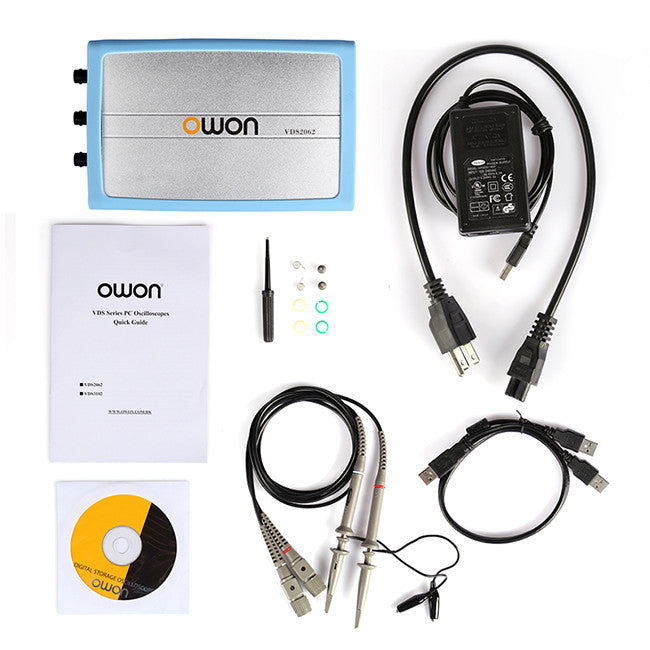
A PC oscilloscope is a device that connects to your computer, usually through USB or Ethernet. It uses your PC’s screen, processor, and memory to display and analyze signals. The hardware part, often called a “module,” is small and portable. Software installed on your computer handles the visualization and measurement.
These devices are popular in education, hobbyist projects, and small labs because they are cheaper and more flexible. Many models come with extra features, like spectrum analyzers or logic analyzers, making them useful for different tasks.
Typical Uses
- Electronics prototyping
- Student labs and learning
- Field testing and troubleshooting
- DIY projects
Common Brands
Some well-known brands are Pico Technology, Hantek, and Rigol (with their USB modules).
What Is A Bench Oscilloscope?
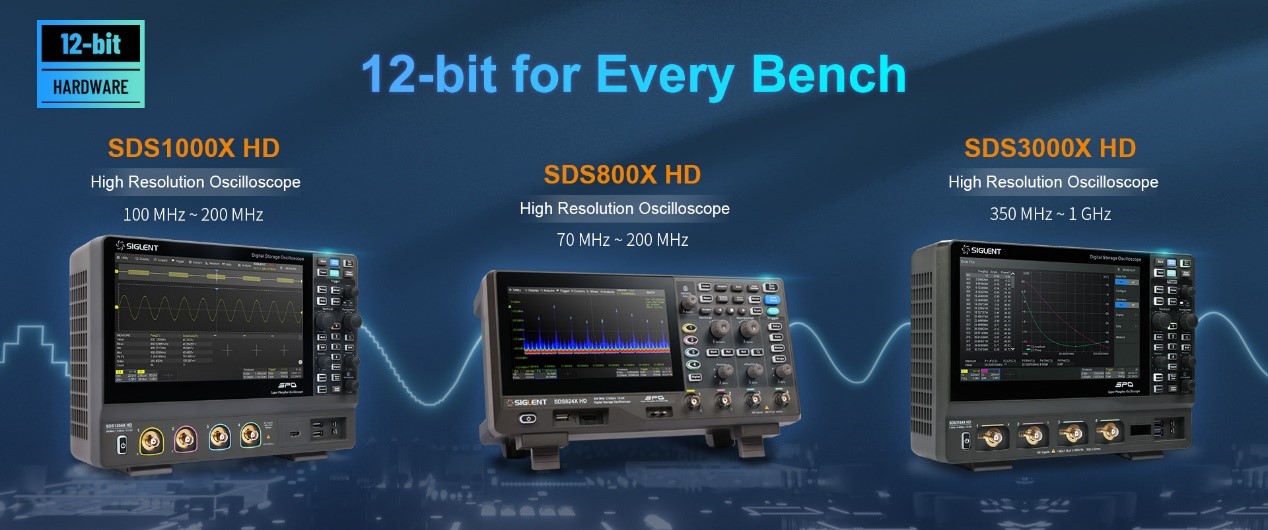
A bench oscilloscope is a stand-alone instrument with its own screen, controls, and hardware. It is designed for professional labs, production lines, and serious testing environments. Bench scopes are usually larger and heavier, but they offer better performance, reliability, and accuracy.
These instruments can be analog or digital, but digital is more common today. Bench scopes often have extra features, such as advanced triggering, math functions, and deep memory.
Typical Uses
- Industrial electronics testing
- Research and development labs
- Manufacturing and quality control
- High-speed signal analysis
Common Brands
Popular brands include Tektronix, Keysight, and Rohde & Schwarz.
Key Differences At A Glance
To quickly understand the main differences, see this simple table:
| Feature | PC Oscilloscope | Bench Oscilloscope |
|---|---|---|
| Portability | Very portable | Usually fixed |
| Cost | Lower | Higher |
| Display | Uses PC screen | Built-in screen |
| Bandwidth | Typically lower | Typically higher |
| Channels | Often 2–4 | 2–8 or more |
| Update Rate | Depends on PC | Dedicated hardware |
Performance: Speed, Bandwidth, And Accuracy
Bandwidth
Bandwidth is a key factor for any oscilloscope. It tells you the highest frequency signal you can measure accurately.
- PC oscilloscopes often range from 20 MHz to 200 MHz
- Bench oscilloscopes usually start at 50 MHz and can reach 1 GHz or more
If you work with digital signals or RF (radio frequency), bench scopes are better. For audio or slow electronics, PC scopes are enough.
Sample Rate
Sample rate means how many times per second the oscilloscope checks the signal.
- PC scopes often offer up to 1 GS/s (giga samples per second)
- Bench scopes can reach 2–5 GS/s or higher
A higher sample rate gives more detail and accuracy, especially for fast signals.
Memory Depth
Bench scopes usually have deeper memory (up to hundreds of megabytes), allowing long signal recordings. PC scopes depend on your computer’s memory, but the USB connection can be a bottleneck.
Accuracy
Bench scopes use dedicated hardware for measurement, so their readings are more reliable. PC scopes may suffer from noise or timing issues, especially if the PC is busy.
Credit: www.ossila.com
User Experience: Interface And Controls
Controls
Bench oscilloscopes have physical knobs and buttons. This makes them easy to use for quick adjustments, especially during live testing. Many engineers find tactile controls essential when troubleshooting.
PC oscilloscopes rely on mouse and keyboard, with all functions handled by software. While this allows for more complex analysis, it can be slower for real-time changes.
Display
Bench scopes have built-in screens, usually with high brightness and clarity. PC scopes use your computer monitor, which can be larger and higher resolution, but may lag if your PC is slow.
Software Features
PC oscilloscopes can take advantage of PC software for advanced analysis, saving data, exporting, and even remote access. Bench scopes often have built-in math functions, but their software is limited compared to a full PC.
Price And Value
One of the biggest differences is cost. Here’s a price comparison:
| Type | Entry-Level Price | Mid-Range Price | High-End Price |
|---|---|---|---|
| PC Oscilloscope | $70–$300 | $300–$800 | $800–$2,000 |
| Bench Oscilloscope | $400–$1,000 | $1,000–$5,000 | $5,000–$20,000+ |
For simple tasks, a PC oscilloscope is often enough. If you need high performance or reliability, a bench oscilloscope is worth the investment.
Practical Examples
Let’s look at two real-world cases to see how these differences matter.
Example 1: A Student Lab
A university electronics lab needs to measure signals from microcontrollers and sensors. The signals are slow (under 10 MHz), and budget is limited. PC oscilloscopes fit perfectly. Students can use their laptops, and the devices are easy to carry.
Example 2: Industrial Debugging
An engineer in a factory needs to troubleshoot a high-speed machine. Signals are fast (hundreds of MHz), and downtime is expensive. A bench oscilloscope with deep memory and high bandwidth is essential. Physical controls allow quick response to problems.
Pros And Cons
Here are some clear advantages and disadvantages for each type:
Pc Oscilloscope
Pros:
- Low cost and easy to buy
- Portable and light
- Flexible software options
- Uses large PC screen
- Can update and upgrade software easily
Cons:
- Limited bandwidth and sample rate
- Depends on PC performance
- Less rugged, may break in rough environments
- Less accurate for critical measurements
Bench Oscilloscope
Pros:
- High performance and accuracy
- Dedicated hardware, reliable results
- Physical controls for fast adjustments
- Deep memory and advanced features
- Rugged, built for tough environments
Cons:
- High cost
- Heavy and not portable
- Software updates may be limited
Credit: www.sainsmart.com
Choosing The Right Oscilloscope
Picking the right oscilloscope depends on your needs, budget, and environment.
Key Questions To Ask
- What frequency range do you need?
- How many channels do you require?
- Do you need to record signals for a long time?
- Is portability important?
- What is your budget?
If you mostly work on low-frequency projects, need portability, and want to save money, a PC oscilloscope is a smart choice. If you need high bandwidth, reliability, and quick controls, a bench oscilloscope is the best option.
Common Mistakes When Choosing
- Ignoring bandwidth needs: Many buyers pick a scope that’s too slow for their signals.
- Underestimating channel count: Some projects need four or more channels, but entry models may have only two.
- Overlooking memory depth: Long signal recordings require deep memory, which PC scopes may not provide.
- Forgetting software compatibility: PC scopes depend on software updates; check if your OS is supported.
Advanced Features: What Matters Most
Modern oscilloscopes offer many features. Here are some that really matter:
- Automatic measurements: Save time and reduce errors.
- Triggering options: Helps capture specific events.
- Math functions: Useful for analysis (FFT, addition, subtraction).
- Protocol decoding: For digital signals like I2C, SPI, UART.
- Data export: Ability to save and share measurements.
Bench scopes usually have stronger triggering and protocol decoding. PC scopes can offer flexible export and analysis, especially for those comfortable with computers.
Who Should Choose Which?
Pc Oscilloscope
- Students
- Hobbyists
- Small labs
- Field workers
If you value portability, price, and flexibility, choose a PC oscilloscope.
Bench Oscilloscope
- Professional engineers
- Industrial labs
- Research teams
If you need speed, accuracy, and reliability, go with a bench oscilloscope.
Non-obvious Insights
- USB power limitations: Many PC scopes rely on USB for power. If your laptop’s USB port is weak, the scope may not work well. Always check power specs.
- Software longevity: PC scopes depend on software updates. If the manufacturer stops updating, your scope may become unusable on new PCs. Bench scopes last longer because their firmware is stable.
Data Table: Typical Specifications
Here’s a comparison of typical specs for each type:
| Specification | PC Oscilloscope | Bench Oscilloscope |
|---|---|---|
| Bandwidth | 20–200 MHz | 50 MHz–1 GHz+ |
| Sample Rate | 100 MS/s–1 GS/s | 500 MS/s–5 GS/s |
| Memory Depth | Up to 128 MB (PC-limited) | Up to 512 MB |
| Channels | 2–4 | 2–8+ |
| Display | PC monitor | Built-in screen |
Useful External Resource
For more in-depth technical details, see the Oscilloscope Wikipedia page.
Credit: siglentna.com
Frequently Asked Questions
What Is The Main Advantage Of A Pc Oscilloscope?
The biggest advantage is portability and low cost. You can use it anywhere with a laptop and get flexible software features.
Can A Pc Oscilloscope Replace A Bench Oscilloscope In A Professional Lab?
Usually, no. For critical measurements and high-speed signals, bench oscilloscopes are better. PC scopes are fine for basic tasks but lack the performance needed in professional environments.
How Many Channels Do I Need?
Most beginners need two channels. If you plan to measure multiple signals at once (for example, differential signals), look for scopes with four or more channels.
Are Pc Oscilloscopes Accurate?
They are accurate for simple and slow signals. For fast or complex signals, bench oscilloscopes are more reliable. PC scopes can suffer from timing errors and noise if the computer is slow.
Can I Use A Pc Oscilloscope With Any Computer?
Most work with Windows and sometimes Mac or Linux, but always check compatibility. Some older scopes may not support modern operating systems.
Choosing between a PC oscilloscope and a bench oscilloscope depends on your projects, budget, and working style. Both tools are valuable, but understanding their differences helps you get the best results in your electronics work.