When you work with electronic testing or signal generation, you’ll often hear about arbitrary waveform generators (AWGs) and function generators. Both are important tools for engineers, students, and professionals in electronics. But choosing the right one can be confusing, especially when their features seem similar on the surface. Understanding the differences and strengths of each device is key to better experiments, reliable measurements, and smarter investments.
What Is A Function Generator?
A function generator is an instrument that creates standard, repetitive waveforms. Most function generators can produce signals like sine, square, and triangle waves. These signals are basic building blocks in electronics, used for testing amplifiers, filters, and other circuits.
The main features of a function generator include:
- Adjustable frequency (how fast the waveform repeats)
- Adjustable amplitude (the height or voltage of the waveform)
- Selectable waveform shape (sine, square, triangle, sometimes ramp or pulse)
- Some offer extra options like DC offset or frequency sweeping
Function generators are simple to use, making them perfect for education, basic troubleshooting, and general lab work.
What Is An Arbitrary Waveform Generator?
An arbitrary waveform generator (AWG) is a more advanced device. Unlike a function generator, an AWG can create almost any shape of electrical signal, not just standard waveforms. You can design a custom signal on a computer, upload it to the AWG, and the device will generate that exact waveform.
Key features of AWGs are:
- Custom waveform output (complex, user-defined shapes)
- High sampling rates for detailed signals
- Greater memory depth for storing complex waveforms
- Often include advanced modulation, sequencing, and triggering options
AWGs are used in research, communications testing, radar, medical device development, and any situation where basic shapes are not enough.
Core Differences Between Awg And Function Generator
To compare these two tools, it helps to look at their functions side by side. The following table highlights key differences:
| Feature | Function Generator | Arbitrary Waveform Generator |
|---|---|---|
| Waveform Types | Standard (sine, square, triangle) | Standard + Custom (any shape) |
| Signal Complexity | Simple, repetitive | Complex, user-defined |
| Sampling Rate | Low to moderate | High (for precision) |
| Memory Depth | Small, fixed | Large, flexible |
| Price | Lower | Higher |
| Use Case | General testing, education | Advanced R&D, communications, medical |
Typical Applications
Where Function Generators Excel
Function generators are found in almost every electronics lab. Some common uses include:
- Testing analog circuits: Sending a sine wave into an amplifier to check its performance.
- Frequency response analysis: Using different frequencies to see how a filter or speaker reacts.
- Pulse testing: Creating simple square waves for digital logic circuits.
- Educational purposes: Teaching students about waveforms and signal properties.
These tasks do not need complex waveforms. The focus is on simplicity, reliability, and ease of use.
Where Arbitrary Waveform Generators Shine
AWGs are chosen when you need more flexibility and precision. Here are some typical applications:
- Simulating real-world signals: Recreating data from ECG (heart monitors) or seismic sensors.
- Testing communication systems: Generating modulated signals like QAM or PSK.
- Component stress testing: Applying complex, time-varying voltages that mimic actual usage.
- Research and development: Creating unique signals for new products.
AWGs open the door to customized testing, which is essential in advanced electronics work.
Credit: www.testandmeasurementtips.com
Technical Deep Dive: How They Work
The Engine Behind A Function Generator
Traditional function generators use analog circuits (like Wien-bridge oscillators) or digital methods to produce their output. The main idea is to produce repeatable, predictable signals with good stability. Many modern generators use digital synthesis, where a waveform is built from data stored in memory.
However, even in digital designs, the available waveforms are still limited by the hardware and software. You might have six or seven preset shapes, but you cannot program your own.
The Heart Of An Arbitrary Waveform Generator
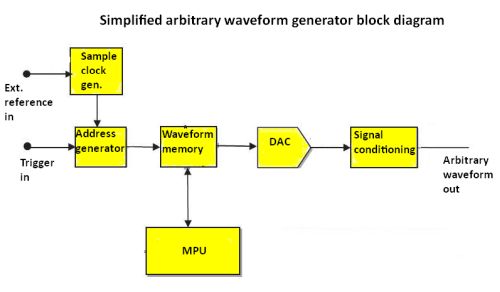
An AWG uses a digital-to-analog converter (DAC) to turn stored digital data into voltage waveforms. The user creates a waveform on a PC, defines each data point, and transfers it to the device. The AWG’s memory stores this data, and the DAC outputs the waveform at a high sampling rate.
The result is an output that can closely match any signal you need, limited only by the device’s memory, resolution, and speed.
Performance Metrics Comparison
It’s useful to see how these devices compare on critical specifications. Here’s a side-by-side look:
| Metric | Function Generator | AWG |
|---|---|---|
| Frequency Range | Up to 20 MHz (typical) | Up to 1 GHz (high-end) |
| Vertical Resolution | 8-12 bits | 14-16 bits (sometimes more) |
| Output Channels | Usually 1-2 | Often 2 or more |
| Modulation Options | Simple (AM, FM, PWM) | Complex, including digital modulation |
| Waveform Memory | Minimal | Deep (MBs or GBs) |
How To Choose: Key Considerations
Selecting between a function generator and an AWG depends on your needs. Consider the following factors:
1. Type Of Waveforms Needed
If you only need standard shapes, a function generator is enough. If you require custom signals, AWG is the answer.
2. Budget Constraints
AWGs are more expensive. For basic testing or educational use, a function generator saves money.
3. Bandwidth Requirements
AWGs offer higher frequency and resolution, which is important for high-speed digital or RF circuits.
4. Ease Of Use
Function generators are quick to set up. AWGs need computer interaction and more setup time.
5. Future Scalability
If your projects may become more complex, investing in an AWG can save future upgrade costs.
A common mistake is buying an AWG for simple jobs, overspending on features you never use. On the other hand, underestimating your future needs may force you to replace a function generator sooner than expected.
Credit: uni-trendus.com
Practical Insights Most Beginners Miss
1. Signal fidelity matters.
Many users focus only on frequency and amplitude but ignore signal purity. AWGs usually have better total harmonic distortion (THD) and lower noise floors, critical for sensitive tests.
2. Output impedance impacts results.
Both devices typically have a 50-ohm output. If your device under test expects a different impedance, you’ll get signal reflections and measurement errors. Always match the generator’s output with the load, or use an attenuator if needed.
3. Software integration is a hidden advantage.
AWGs often support advanced sequencing, scripting, and automation. This can save hours in repeated testing, especially in R&D labs.
Real-world Example: Testing A Communication System
Imagine you’re developing a new radio receiver. You need to test how it handles various digital signals under noisy conditions. A function generator can provide simple carriers and modulations, but it cannot produce a digitally modulated noise signal.
An AWG allows you to:
- Upload a real-world noisy waveform
- Sequence different modulations
- Automate the test pattern
This level of control reveals problems that would be invisible using only a function generator.
Cost Vs. Value: Making The Right Investment
While AWGs are more expensive, they offer more flexibility. However, the extra features only matter if you use them. For classroom labs, repair shops, or routine testing, a quality function generator is often the better value.
If you work in communications, aerospace, or advanced research, an AWG’s ability to generate realistic, complex signals can justify the higher price. Always check the specs—especially sampling rate, vertical resolution, and memory depth—before making a decision.
Comparison Of Popular Models
To make things practical, here’s a quick look at some common devices on the market:
| Model | Type | Max Frequency | Vertical Resolution | Price Range |
|---|---|---|---|---|
| Keysight 33500B | Function Generator | 20 MHz | 16 bits | $1,500+ |
| Tektronix AFG31000 | AWG | 250 MHz | 16 bits | $4,000+ |
| Rigol DG1022Z | Function Generator | 25 MHz | 14 bits | $350+ |
| Rohde & Schwarz HMF2550 | AWG | 50 MHz | 14 bits | $2,500+ |
Prices and specs can change, so always check the latest data from manufacturer websites.
When To Choose Each Device
- Choose a function generator if:
You mostly need standard waveforms, work on analog or digital basics, or want a lower-cost tool.
- Choose an AWG if:
You must simulate real-world signals, test complex devices, or need future-proof flexibility.
It’s rare that one device can truly replace the other. Large labs often have both. For most individual users, start with a function generator and upgrade if your projects demand more.
Frequently Asked Questions
What Is The Main Difference Between An Awg And A Function Generator?
The main difference is flexibility. A function generator creates only standard waveforms (sine, square, triangle), while an AWG can generate any user-defined signal shape.
Can A Function Generator Be Used As An Awg?
Most function generators can only output preset waveforms. Some advanced models add limited “arbitrary” features, but they can’t match a true AWG’s flexibility or memory depth.
Are Awgs Harder To Use Than Function Generators?
AWGs often require more setup, including waveform design on a computer and data transfer. For simple signals, function generators are faster and easier to use.
Do Awgs Replace Function Generators In All Labs?
No. Many labs need both. Function generators are cost-effective for basic tasks, while AWGs are essential for advanced, custom, or high-frequency testing.
Where Can I Learn More About Waveform Generators?
You can find more details and technical guides on the Wikipedia Arbitrary Waveform Generator page.
Both function generators and AWGs are valuable tools in electronics. By knowing their strengths and limitations, you can make smarter choices for your projects, save money, and get better results in your testing and development work.

Credit: www.youtube.com