A digital world runs on wires, circuits, and signals—most of them hidden behind walls, under desks, or inside devices. For anyone involved in electronics, IT, or home improvement, testing and troubleshooting these invisible pathways is essential. That’s where the multimeter and the cable tester come in. They’re both tools for checking electrical systems, but they serve different needs and offer unique advantages. Many beginners confuse their functions or think they do the same job. The truth is, choosing the right tool can save you hours of frustration, prevent costly mistakes, and help you finish your work safely.
This article will break down everything you need to know about multimeters and cable testers. We’ll explore how each tool works, what problems they solve, and when to use one over the other. Whether you’re a DIY enthusiast, a budding electrician, or an IT technician, you’ll get clear answers, practical advice, and insights that most people miss. By the end, you’ll know exactly which tool fits your needs—and why sometimes, you might want both.
What Is A Multimeter?
A multimeter is a versatile handheld device used to measure electrical values in circuits and components. Most modern multimeters are digital (DMM), but analog types are still available. They typically measure three main things:
- Voltage (Volts): Checks electrical potential between two points.
- Current (Amps): Measures the flow of electric charge.
- Resistance (Ohms): Tests how much a material resists the flow of electricity.
Many models also test continuity (to check if a wire is complete), diodes, and sometimes even temperature.
How Multimeters Work
When you connect the multimeter’s probes to a circuit, the device displays a value for the selected function. For example, set it to voltage mode, touch the probes to two points, and you’ll see the voltage between them. You can switch between different functions using a dial or buttons.
Key Features Of Multimeters
- Auto-ranging: The meter automatically selects the measurement range.
- Manual ranging: The user chooses the range, useful for more control.
- Backlit display: For reading values in dark areas.
- Hold function: Freezes the value on screen.
- Safety ratings: Such as CAT II, CAT III, CAT IV, indicating where it’s safe to use.
Types Of Multimeters
- Analog multimeters: Use a needle and dial, good for trends, but harder to read.
- Digital multimeters: Give direct number readings, more common and user-friendly.
Typical Uses
- Diagnosing electrical problems in cars and appliances.
- Checking batteries and power supplies.
- Measuring wall outlet voltage.
- Testing electronics projects.
Multimeters are the “Swiss army knife” of electrical work. But they’re not designed for everything—especially not for complex cable testing.
What Is A Cable Tester?
A cable tester is a tool made to check the integrity and wiring of cables, especially those used for data and communication. Unlike multimeters, cable testers focus on connectivity, wiring order, and signal quality within cables.
How Cable Testers Work
Most cable testers have two units—a main tester and a remote. You plug one end of the cable into the main unit and the other into the remote. The tester sends signals through the cable and checks if they reach the other end correctly.
Some advanced cable testers show wiring diagrams, pinouts, and even cable length. Basic models use LEDs to indicate pass/fail for each wire.
Key Features Of Cable Testers
- Wiring check: Verifies each wire is connected correctly.
- Continuity test: Ensures no breaks in the cable.
- Short circuit detection: Finds wires that touch when they shouldn’t.
- Open circuit detection: Spots wires that don’t connect at all.
- Split pair detection: Identifies wires crossed inside the cable.
- Shield test: Checks if shielding is connected properly (for shielded cables).
Types Of Cable Testers
- Basic testers: Show continuity and wiring order, mostly for home use.
- Advanced testers: Measure cable length, signal quality, and network speed.
- Specialized testers: Designed for fiber optic cables, coaxial cables, or telephone lines.
Typical Uses
- Testing Ethernet cables (Cat5, Cat6, Cat7) in networks.
- Checking phone lines.
- Verifying HDMI or coaxial cable connections.
- Troubleshooting home theater or surveillance systems.
Cable testers are the “network doctor” for your wiring. They don’t measure voltage or current, but they reveal hidden wiring problems.
Core Differences: Multimeter Vs Cable Tester
It’s easy to see why people mix up these tools—they both have probes and test wires. But their jobs are very different. Here’s a side-by-side look:
| Feature | Multimeter | Cable Tester |
|---|---|---|
| Main Purpose | Measures voltage, current, resistance | Checks cable wiring and continuity |
| Common Use | Electrical systems, electronics repair | Network, phone, AV cable installation |
| Detects Miswiring | No (except simple continuity) | Yes (shows which wires are wrong) |
| Measures Power | Yes | No |
| Signal Quality Test | No | Some advanced models |
| Price Range | $10–$500+ | $10–$1,000+ |
Not-so-obvious Insights
Most beginners don’t realize:
- Cable testers can’t measure voltage or current. If you try to use one on a live circuit, you risk damaging the tester or hurting yourself.
- Multimeters can’t check wiring order in multi-wire cables (like Ethernet). You might see “continuity,” but not know if the wires are crossed or swapped.
Using the wrong tool leads to incomplete testing and missed problems.
When To Use A Multimeter
Multimeters are best for:
- Measuring power supply voltage (Is my outlet live? Is my battery good? ).
- Testing fuses or switches (Is the part broken, or is there a wiring issue? ).
- Diagnosing electrical faults in vehicles, appliances, or DIY electronics.
- Checking resistors, diodes, and components for proper values.
Imagine you’re working on a broken lamp. A multimeter helps you check if the plug has power, if the switch works, and if the bulb’s filament is good. It’s also the go-to tool for solar panels, batteries, or any project involving electricity flow.
Practical Tips
- Always start with the highest range if using a manual-ranging multimeter.
- Test on a known good source first to confirm your multimeter works.
- Never use a multimeter to test live data cables (Ethernet, phone) unless you know they’re safe and unpowered.

Credit: www.ebay.com.au
When To Use A Cable Tester
Cable testers shine in:
- Installing or repairing network cables (Cat5, Cat6, Cat7).
- Checking long cable runs for breaks or poor connections.
- Verifying patch panels, wall jacks, and custom cable ends.
- Troubleshooting “no signal” errors in home theaters or surveillance systems.
Suppose you’ve wired a new office with Ethernet cables. A cable tester quickly shows if each wire is in the right order, not just if current flows. It catches split pairs, reversed wires, or missing connections that can cause slow networks or no connection at all.
Practical Tips
- Always test cables after crimping both ends—errors are common, even for pros.
- Label cables after testing to avoid confusion later.
- For long runs, use a tester with length measurement to find breaks.
Advanced Features: What Extra Functions Matter?
Both multimeters and cable testers can have extra features. But are they worth it?
Advanced Multimeter Features
- True RMS measurement: More accurate for non-sinusoidal AC signals (common in modern devices).
- Temperature probe: Checks heat in circuits or components.
- Frequency measurement: Useful for audio/video work or power supplies.
- Data logging: Stores readings over time, helpful for troubleshooting.
Advanced Cable Tester Features
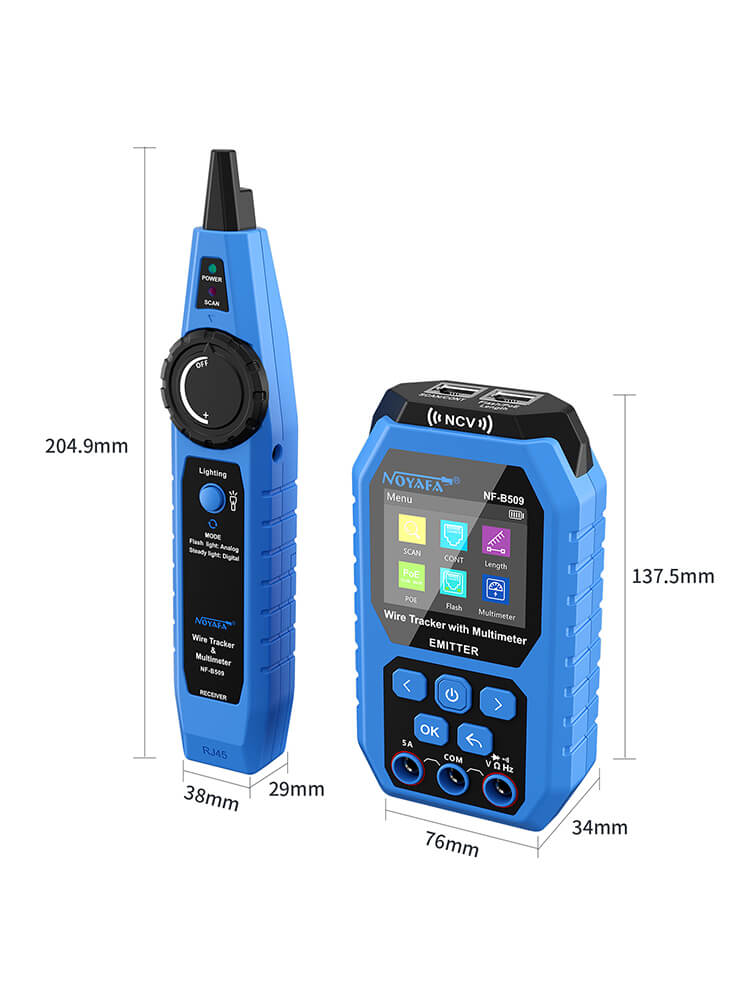
- Tone generator and probe: Helps locate cables hidden in walls.
- Length measurement: Finds distance to a break or short.
- Network speed test: Checks if a cable supports Gigabit Ethernet.
- PoE (Power over Ethernet) detection: Verifies power on network cables.
For most users, basic models are enough. But if you work with large networks or complex electronics, these extras can save a lot of time.
Cost Comparison: What Should You Expect To Pay?
Tool prices vary by brand, features, and accuracy.
| Tool Type | Basic Price Range | Advanced Price Range | Common Brands |
|---|---|---|---|
| Multimeter | $10–$50 | $100–$500+ | Fluke, Klein, Extech |
| Cable Tester | $10–$60 | $150–$1,000+ | Fluke Networks, Klein Tools, TRENDnet |
Professional electricians and network installers may spend hundreds on top models. For most DIY or home use, mid-range tools give good value and reliability.
Common Mistakes When Choosing Or Using These Tools
Even experienced users make errors with multimeters and cable testers. Here are the most important pitfalls to avoid:
- Using a cable tester on a live circuit: Most cable testers aren’t made for powered lines. This can destroy the tester or cause injury.
- Assuming continuity means correct wiring: A multimeter will say a wire is “good” if there’s no break, but won’t show if the wires are swapped or crossed.
- Ignoring safety ratings: Multimeters have safety categories (CAT ratings). Using a low-rated meter on high-energy circuits is dangerous.
- Not testing after installation: Cables may look fine but have hidden faults. Always test before closing walls or finishing a project.
- Buying unnecessary features: A beginner rarely needs data logging or signal analysis. Start simple, upgrade as your needs grow.
How To Test Cables With A Multimeter (and Why It’s Not Enough)
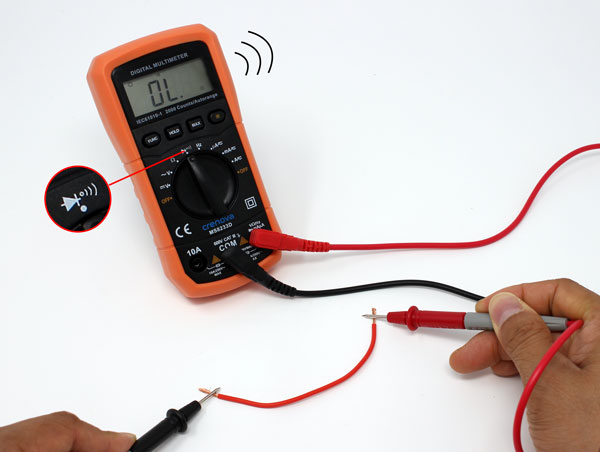
You can use a multimeter to check continuity in a cable. Here’s how:
- Set the meter to continuity mode (often marked with a sound icon).
- Place a probe on each end of one wire.
- If the wire is good, you hear a beep or see a zero/low value.
- Repeat for every wire in the cable.
But here’s the catch: This only tells you if each wire is unbroken. It won’t show if you’ve mixed up the order (like putting wire #2 on pin #3). In complex cables (Ethernet, HDMI), this is a major risk.
Pro tip: Use a cable tester for any multi-wire cable, especially if wiring order matters.
How To Test Cable Order With A Cable Tester
A cable tester makes this process easy:
- Plug one end of the cable into the main unit, the other into the remote.
- Turn on the tester. LEDs or a display show if each wire is connected correctly.
- If a wire is missing, crossed, or swapped, the tester shows exactly which one.
This saves hours of guesswork and avoids network problems later.
Real-world Examples
Let’s look at two scenarios:
Example 1: Home User Fixing A Lamp
You have a lamp that won’t turn on. A multimeter helps you:
- Check if the wall outlet has voltage.
- See if the lamp’s switch is working.
- Test if the bulb is burned out.
A cable tester wouldn’t help here.
Example 2: Office It Setting Up New Network
You just installed 20 Ethernet cables for a new office. A cable tester helps you:
- Make sure every cable is wired correctly (no pairs swapped).
- Test for open circuits or shorts.
- Confirm cables support the right network speed.
A multimeter would only show if the wires are continuous, not if they’re in the right order.
Which Tool Should You Buy First?
If you’re just starting out, ask yourself:
- Are you working mostly with power and electronics? Get a good digital multimeter.
- Are you wiring network, phone, or AV cables? Start with a cable tester.
If you plan to do both, you’ll eventually need both tools. Each solves different problems. Trying to use one for the other’s job leads to missed faults and wasted time.
Credit: www.cs2n.org
Professional Vs Diy Use
Professionals often need both tools, and usually buy higher-quality models for accuracy and safety. They may also use advanced testers that cost hundreds or thousands of dollars, especially in large buildings or data centers.
DIY users can start with affordable models—many good digital multimeters and basic cable testers cost less than $30 each. Always read reviews and check safety ratings before buying.
Safety Considerations
- Never connect a cable tester to a live (powered) circuit.
- Check the CAT safety rating on your multimeter before measuring outlets or high-energy lines.
- Wear gloves and eye protection when working with electricity.
- If in doubt, consult a qualified electrician or network specialist.
Environmental And Maintenance Tips
- Store tools in a dry place—moisture can damage electronics.
- Replace batteries regularly to ensure accurate readings.
- Check probes and connectors for damage before use.
- Calibrate professional multimeters yearly for best results.
Learning More And Getting Help
Understanding these tools improves with hands-on practice. Many online guides and videos show real-world use. For more technical details, the Wikipedia Multimeter page offers a deeper dive.
Credit: www.noyafa.com
Frequently Asked Questions
What’s The Main Difference Between A Multimeter And A Cable Tester?
A multimeter measures electrical values (voltage, current, resistance) and is used for diagnosing electrical and electronic systems. A cable tester checks the wiring integrity and order in cables, especially for data and communication lines.
Can I Use A Multimeter As A Cable Tester?
You can use a multimeter to check continuity in simple cables, but it won’t reveal wiring order or detect split pairs in multi-wire cables like Ethernet. For complete cable testing, you need a dedicated cable tester.
Is It Safe To Use A Cable Tester On Live Wires?
No, most cable testers are designed for unpowered cables only. Connecting them to live wires can damage the tester and cause injury.
Which Is Better For Home Use—a Multimeter Or A Cable Tester?
If you mostly work with electrical repairs (outlets, appliances, batteries), get a multimeter. If you install or fix network/AV cables, a cable tester is more useful. Many homeowners eventually find both tools helpful.
How Much Should I Spend On These Tools As A Beginner?
Reliable digital multimeters and basic cable testers start at around $20–$40. Avoid the cheapest models with poor reviews. Upgrade as your needs and skills grow.
The right tool makes every project safer, faster, and more reliable. By understanding the differences and choosing wisely, you’ll avoid common mistakes and get better results—whether fixing a lamp or wiring a network.