If you are new to electronics, you may wonder about the difference between a function generator and a power supply. Both are common tools in labs and workshops, but they serve very different purposes. Understanding how they work, when to use each, and the technical details can help you avoid mistakes and get more from your projects. This article will guide you through their functions, differences, use cases, and practical advice, making the concepts easy to grasp even if English is not your first language.
What Is A Function Generator?
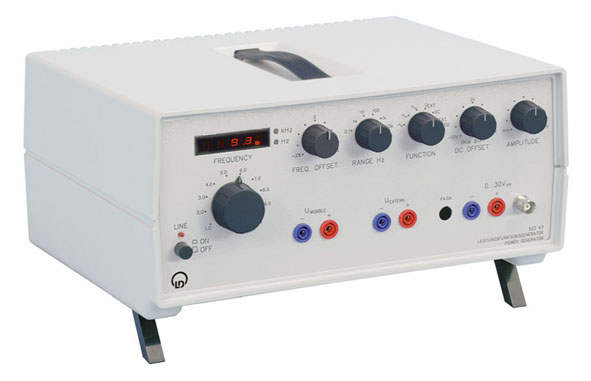
A function generator is a device that creates electrical waveforms. These waveforms are used for testing and designing circuits. The most common types are sine, square, triangle, and sawtooth waves. You can set the frequency, amplitude, and sometimes even the shape.
For example, if you are testing an audio amplifier, you can use a function generator to send a sine wave into the input. By changing the frequency, you see how the amplifier responds to different sounds.
Many function generators can output frequencies from a few hertz (Hz) to several megahertz (MHz). Some newer models even go higher. They are often used in signal testing, component analysis, and waveform simulation.
Common Features
- Adjustable frequency (often 0.1 Hz to 10 MHz)
- Selectable waveform types (sine, square, triangle)
- Variable amplitude
- Some offer pulse or arbitrary waveforms
- Usually have LCD or LED displays
Practical Example
Suppose you want to test how a filter circuit responds to different frequencies. You connect the function generator to the filter’s input. You sweep from 100 Hz to 10 kHz and measure the output. This helps you see where the filter works best.
What Is A Power Supply?
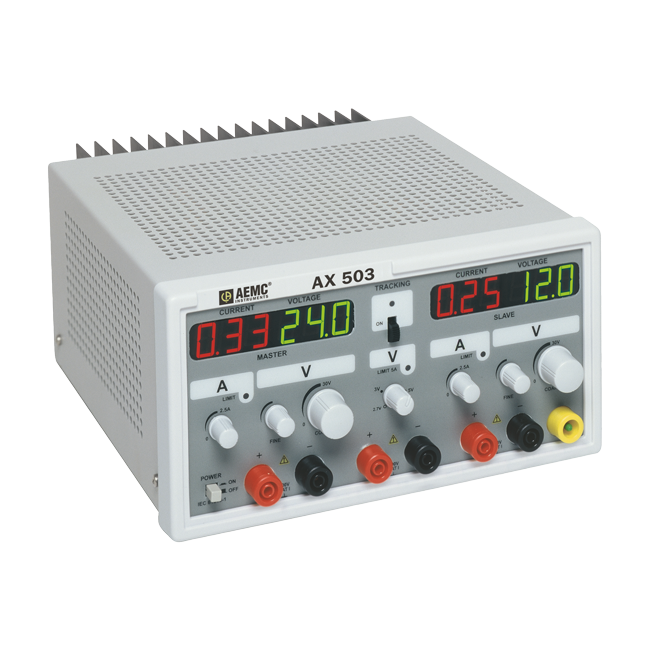
A power supply provides electrical power to a circuit. It is not meant to create waveforms, but to supply steady voltage and current. Most lab power supplies are adjustable. You set the voltage and current limits, and the device keeps the output stable.
For example, if you are building a radio, you need a stable voltage to power the circuit. A power supply gives you that, making sure your project does not get too much or too little power.
Most power supplies can output voltage from 0 to 30 V and current from a few milliamps (mA) up to several amps (A). Some are linear, offering very clean power, while others are switching, which are more efficient but may have some electrical noise.
Common Features
- Adjustable voltage and current
- Display for voltage and current
- Overcurrent protection
- Some models have multiple outputs
Practical Example
You want to test a microcontroller board. The datasheet says it needs 5 V and can draw up to 500 mA. You set your power supply to 5 V, with a current limit of 500 mA. If there is a short circuit, the supply will not exceed the current limit, protecting your board.
Key Differences: Function Generator Vs Power Supply
Let’s break down the main differences clearly. Understanding these will help you avoid using the wrong tool and damaging your circuit.
| Feature | Function Generator | Power Supply |
|---|---|---|
| Purpose | Creates test signals | Provides steady power |
| Output Type | Waveforms (AC or pulsed DC) | Constant DC voltage/current |
| Typical Output | Sine, square, triangle, etc. | 0–30 V DC (usually) |
| Frequency Range | Hz to MHz | None (DC only) |
| Current Capacity | Low (usually <100 mA) | High (1–10 A or more) |
| Main Use | Testing circuit responses | Powering circuits |
Non-obvious Insights
- Output Impedance: Function generators often have a high output impedance (usually 50 ohms). This means if you connect them directly to a circuit needing high current, the voltage will drop. Power supplies, in contrast, are designed for low impedance, so they can deliver power without dropping voltage.
- Safety Limits: Power supplies let you set current limits. If your circuit draws too much, the supply cuts off or lowers the voltage. Function generators rarely have this feature, so connecting them to heavy loads can damage the generator.
Use Cases: When To Use Each Device
Choosing the right tool depends on your task. Here are common scenarios:
Function Generator Use Cases
- Testing audio circuits (speakers, amplifiers)
- Simulating sensor signals
- Checking filter response
- Teaching waveform theory in labs
- Diagnosing circuit faults by injecting signals
Power Supply Use Cases
- Powering development boards (Arduino, Raspberry Pi)
- Running motors or LEDs
- Charging batteries (with the right settings)
- Testing circuit stability at different voltages
- Providing power for long-term experiments
Example Scenario
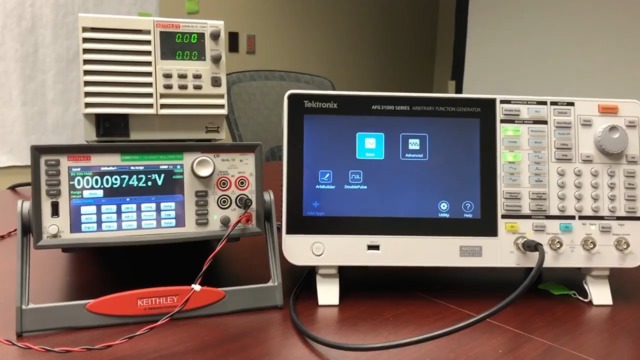
Suppose you are designing a digital clock. First, you use a function generator to simulate the clock pulse. Once the circuit works, you power it with a power supply to see if it runs stable for hours.
Credit: www.tek.com
Technical Specifications Compared
Technical details matter when choosing between devices. Here is a comparison of typical specs.
| Specification | Function Generator | Power Supply |
|---|---|---|
| Voltage Output | Up to 20 V (peak-to-peak) | 0–30 V (DC) |
| Current Output | Up to 100 mA | Up to 10 A |
| Waveforms | Sine, square, triangle, arbitrary | None (DC only) |
| Frequency Range | 0.1 Hz–10 MHz | Not applicable |
| Output Impedance | 50 ohms (typical) | Low (few milliohms) |
| Protection | Rarely includes current limit | Overcurrent, overvoltage protection |
Real-world Data
- A popular function generator, like the Rigol DG1022, can output up to 20 Vpp and frequencies up to 20 MHz, but only about 10–20 mA.
- A typical lab power supply, such as the Tektronix PWS4323, can provide up to 32 V and 3 A, with precise control and safety features.
Common Mistakes And How To Avoid Them
Many beginners confuse these devices or use them incorrectly. Here are mistakes to watch for:
- Using a function generator to power circuits: Never use a function generator to run a microcontroller or motor. It does not provide enough current, and the waveform is not steady DC.
- Connecting heavy loads to a function generator: If you connect a circuit needing high current, the function generator’s output will drop sharply, and you may damage the device.
- Setting power supply voltage too high: Always check your circuit’s voltage rating. Too much voltage can burn out components.
- Ignoring current limits: If your power supply does not have a current limit, you risk overheating or damaging your circuit. Always set a safe limit.
- Mixing up signal and power roles: Use the function generator for signals, and the power supply for power. Do not try to swap these roles.
Credit: www.leybold-shop.com
Choosing The Right Device For Your Needs
When deciding which device to buy or use, ask yourself:
- Do I need to test circuit response to different waveforms? Choose a function generator.
- Do I need stable power for a circuit? Choose a power supply.
- Am I working with high-power devices (motors, lights)? Go for a power supply.
- Am I analyzing frequency response, filters, or amplifiers? Use a function generator.
Factors To Consider
- Output voltage and current range
- Waveform options (only function generator)
- Display and controls
- Protection features
- Price and reliability
If you need both signal and power, you may need both devices. Some advanced function generators offer limited power supply functions, but they usually cannot replace a real power supply.
Comparison Table: Quick Reference
Here is a quick summary to help you choose:
| Task | Best Device | Why? |
|---|---|---|
| Powering a microcontroller | Power supply | Stable DC, enough current |
| Testing an amplifier | Function generator | Variable waveforms |
| Charging a battery | Power supply | Controlled voltage and current |
| Analyzing filter response | Function generator | Adjustable frequency |
| Running a motor | Power supply | High current |
| Simulating sensor output | Function generator | Custom waveforms |
Credit: www.aemc.com
Practical Tips For Beginners
- Always check your circuit’s voltage and current needs before connecting any device.
- When using a function generator, match the output impedance to your circuit to avoid signal loss.
- Use overcurrent protection on power supplies to prevent accidents.
- Never use a function generator for powering devices—it is not designed for that.
- Read the manuals for each device. Small differences in specs can matter a lot.
Advanced Insights
Some modern devices combine both features, called programmable power supplies or arbitrary waveform generators. These can output custom waveforms and act as basic power supplies, but they usually have limits in current and voltage. For most tasks, traditional devices are more reliable.
Also, be aware that many circuits, especially digital ones, need clean DC power. Power supplies are designed for this. Function generators can inject noise if used incorrectly.
For more technical details, you can visit Wikipedia’s page on electronic test equipment.
Frequently Asked Questions
What Is The Main Difference Between A Function Generator And A Power Supply?
A function generator creates test signals (waveforms), while a power supply gives steady DC voltage and current to power circuits. Use the function generator for testing and the power supply for running devices.
Can I Use A Function Generator As A Power Supply?
No. Function generators are not designed to power devices. They output signals with limited current and are meant for testing, not powering circuits.
Why Does A Function Generator Have A 50-ohm Output?
This 50-ohm output impedance matches many test circuits and helps with signal transmission. It is not suitable for powering high-current devices.
How Do I Set Current Limits On A Power Supply?
Most lab power supplies have a knob or setting for current limit. Set this to a value just above your circuit’s maximum draw to protect your components.
What Happens If I Connect A Function Generator To A Heavy Load?
The output voltage will drop, the waveform may distort, and you could damage the function generator. Always use it with light loads (like signal inputs), not power-hungry devices.
Final Thoughts
Choosing between a function generator and a power supply is easy once you know their roles. The function generator is your tool for sending signals and testing circuit behavior. The power supply gives your project steady, safe power. Mixing up these tools is a common beginner mistake, but now you know how to avoid it.
As you build more projects, understanding these devices will help you create safer, better, and more reliable electronics.