
When your WiFi is slow or unreliable, it can be hard to know what’s wrong. Is it your router? The neighbor’s network? Or is there interference from something else entirely? Two powerful tools—WiFi analyzers and spectrum analyzers—can help. But while these tools sound similar, they serve different purposes and offer unique insights. Understanding the differences, strengths, and limitations of each is the key to solving wireless problems efficiently.
What Is A Wifi Analyzer?
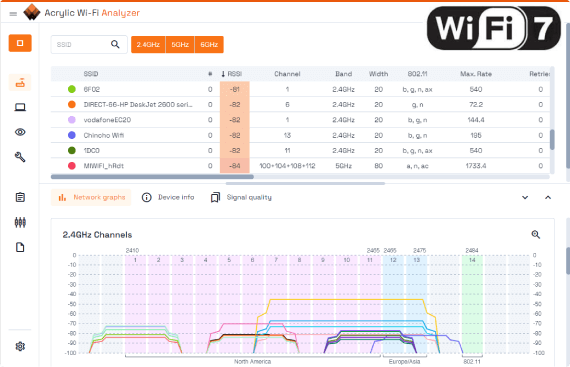
A WiFi analyzer is a software tool or device that examines and displays information about wireless networks in your area. It scans the airwaves for WiFi signals, showing details like signal strength, channel usage, and SSID names. These tools are designed for WiFi troubleshooting and optimization.
Most WiFi analyzers are easy to use. You can find many as smartphone apps or computer programs. They help you see which channels are crowded, which networks are nearby, and how strong your own signal is. Some advanced models offer heatmaps, helping you visualize coverage in different rooms.
Key Features Of Wifi Analyzers
- Network discovery: Lists all visible WiFi networks, including their names and security types.
- Signal strength monitoring: Shows how strong or weak each network’s signal is in real time.
- Channel analysis: Reveals which WiFi channels are most crowded, helping you select a less congested one.
- Device information: Some tools display details about connected devices, MAC addresses, and signal quality.
- Heatmapping: Visualizes WiFi coverage in different locations (mostly in premium or professional tools).
Common Uses For Wifi Analyzers
- Choosing the best channel for your router to avoid interference.
- Finding dead zones or weak spots in your home or office.
- Troubleshooting slow or dropping connections.
- Checking for unauthorized devices on your network.
A popular example is NetSpot, which allows users to create a visual map of their WiFi coverage. Free apps like WiFi Analyzer for Android also provide basic channel and signal information.
What Is A Spectrum Analyzer?
A spectrum analyzer is a more advanced tool that measures and displays the radio frequency (RF) spectrum. Unlike WiFi analyzers, spectrum analyzers do not focus only on WiFi signals. They show all wireless signals within a selected frequency range, whether from WiFi routers, Bluetooth devices, cordless phones, microwaves, or even unknown sources.
Most spectrum analyzers are hardware devices, though some software versions exist when paired with compatible radio receivers. These tools are essential for professionals working in wireless engineering, network design, and interference detection.
Key Features Of Spectrum Analyzers
- Wide frequency coverage: Can scan a large range of frequencies, not limited to WiFi bands.
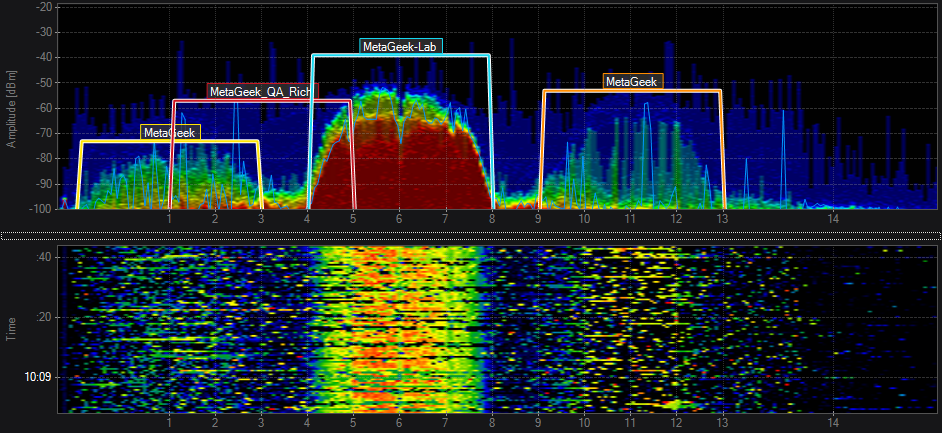
- Signal visualization: Shows a real-time graph of all detected signals, including their strength and frequency.
- Detection of non-WiFi interference: Identifies sources like microwaves, baby monitors, or other electronics that may disrupt WiFi.
- Advanced measurement: Can analyze signal quality, bandwidth, and modulation.
Common Uses For Spectrum Analyzers
- Detecting and identifying all sources of RF interference in an area.
- Troubleshooting complex wireless issues beyond just WiFi.
- Planning and validating wireless installations in crowded environments.
- Spectrum compliance and regulatory testing.
Some well-known spectrum analyzers include the Keysight N9320B (hardware) and MetaGeek’s Wi-Spy (which combines hardware and software).
Wifi Analyzer Vs Spectrum Analyzer: Core Differences
While both tools can help with wireless problems, they serve different roles. Here’s a side-by-side comparison to highlight the main distinctions:
| Feature | WiFi Analyzer | Spectrum Analyzer |
|---|---|---|
| Focus | WiFi networks only (2.4 GHz, 5 GHz, sometimes 6 GHz) | All RF signals in selected band (WiFi, Bluetooth, etc.) |
| Form | Mostly software (apps, PC tools) | Mainly hardware (standalone, USB devices) |
| Ease of Use | User-friendly, quick setup | Requires technical knowledge |
| Cost | Often free or low-cost | Expensive (hundreds to thousands of dollars) |
| Interference Detection | Limited to WiFi interference | Detects all sources, even non-WiFi |
| Typical Users | Home users, IT staff | Engineers, network pros |
Practical Scenarios: When To Use Each Tool
Choosing the right tool depends on your problem and your technical skill.
When A Wifi Analyzer Is Enough
If you want to improve your home network, a WiFi analyzer is usually all you need. For example, if your signal is weak in the bedroom, you can use a WiFi analyzer app to:
- Check the signal strength in different rooms.
- Identify which channels are crowded by neighbors’ networks.
- Move your router or change its channel for better coverage.
WiFi analyzers are also helpful for small offices or cafes that want quick insight without spending much. Because they’re easy to use, even non-technical users can get meaningful results.
When You Need A Spectrum Analyzer
If you still have problems after trying a WiFi analyzer, you may be dealing with non-WiFi interference. For example, some baby monitors, microwaves, or older cordless phones transmit signals in the 2.4 GHz band—right where WiFi lives. A spectrum analyzer will show all signals, not just WiFi. This makes it possible to:
- Spot unknown sources of interference that WiFi analyzers miss.
- See if your WiFi channels are being jammed by other electronics.
- Diagnose complex issues in large offices, hospitals, or factories.
Spectrum analyzers are also essential for wireless engineers who need to validate and certify installations, or for anyone working in environments with multiple wireless technologies.
Key Factors To Consider Before Choosing
Both tools have their place, but not everyone needs both. Here are important factors to keep in mind:
- Complexity of your environment: Simple home networks rarely need a spectrum analyzer. Busy offices, factories, or event spaces may require one.
- Type of interference: If you suspect interference from non-WiFi devices, only a spectrum analyzer will reveal the cause.
- Budget: WiFi analyzers are much cheaper. Spectrum analyzers are a big investment, often starting at several hundred dollars.
- Technical skill: WiFi analyzers are plug-and-play. Spectrum analyzers have a learning curve and may require training.
- Level of detail needed: WiFi analyzers give actionable info for most users. Spectrum analyzers provide much deeper insights for pros.
Real-world Examples
Consider a small business owner named Sarah. She runs a café and notices that customers complain about slow WiFi at certain times. Using a WiFi analyzer app, she discovers that neighboring networks are using the same channel. She switches her router to a less crowded channel and the problem is solved.
Now imagine a hospital IT specialist. The hospital’s WiFi works fine most days, but sometimes medical equipment loses connection. A WiFi analyzer shows nothing unusual. Using a spectrum analyzer, the specialist finds that a new wireless heart monitor is producing strong signals in the same band, causing interference.
The equipment is moved to a different frequency, solving the issue.
Credit: support.oscium.com
Data: Performance Comparison
To give you a clearer idea, here’s a comparison of the types of information each tool can provide:
| Information Type | WiFi Analyzer | Spectrum Analyzer |
|---|---|---|
| SSID, Security, Signal | Yes | No |
| Channel utilization | Yes | Yes |
| Non-WiFi devices | No | Yes |
| Visual spectrum graph | Limited (some apps) | Comprehensive |
| Device detection | WiFi devices only | All RF sources |
| Historical data/logging | Some apps | Most devices |
Common Mistakes To Avoid
- Assuming more data is always better: Spectrum analyzers provide lots of information, but most users need only what WiFi analyzers offer.
- Ignoring non-WiFi interference: If you only use WiFi analyzers, you might miss hidden sources of interference.
- Overcomplicating simple problems: Don’t jump to expensive tools if a basic app can solve your issue.
- Forgetting about device compatibility: Some WiFi analyzers work only on certain operating systems or require specific WiFi adapters.
- Not updating your tools: Wireless standards change. Make sure your analyzer supports the latest WiFi versions (like WiFi 6 or 6E).

Credit: www.ekahau.com
Non-obvious Insights For Beginners
Many people don’t realize that some WiFi problems aren’t caused by WiFi at all. Devices like Bluetooth headsets, older wireless cameras, and even some smart home gadgets can overlap with WiFi frequencies, causing issues that basic analyzers cannot see.
Another overlooked tip: Physical obstacles like concrete walls, metal shelves, or even large aquariums can weaken your signal. While WiFi analyzers help you spot weak areas, moving your router or using mesh systems can often fix problems more easily than changing channels.
How To Get The Most From Each Tool
- Plan your survey: Walk around your space with a WiFi analyzer to map weak spots. Try different times of day, since interference can change.
- Understand what the graphs mean: Peaks in spectrum analyzer graphs often mean interference. Learn to read them before making changes.
- Combine tools if needed: Sometimes, using both a WiFi analyzer and, if needed, a spectrum analyzer provides the clearest picture.
- Document your changes: Keep notes on what you changed and when, so you can track improvements or problems over time.
- Stay updated: Wireless environments change. Regularly repeat your checks, especially after adding new devices.
Comparing Cost And Accessibility
Let’s look at the practical side: cost and how easy each tool is to use.
| Aspect | WiFi Analyzer | Spectrum Analyzer |
|---|---|---|
| Typical Price | Free–$50 (apps), $100–$500 (pro tools) | $400–$10,000+ |
| Setup Time | Minutes | Up to several hours |
| User Skill Level | Beginner to advanced | Advanced/professional |
| Support & Documentation | Wide community support, many guides | Technical manuals, vendor support |
Expert Recommendations
For most home users and small businesses, start with a good WiFi analyzer. Only consider a spectrum analyzer if you have persistent, unexplained problems or work in a highly technical environment.
Professionals and organizations dealing with sensitive or mission-critical networks should invest in a spectrum analyzer and learn to use it properly. In some cases, hiring a wireless consultant for a spectrum analysis survey is more cost-effective than buying the tool outright.
If you’re interested in learning more about how spectrum analyzers work, the Wikipedia entry on spectrum analyzers offers in-depth technical details.
Credit: www.acrylicwifi.com
Frequently Asked Questions
What Is The Main Difference Between A Wifi Analyzer And A Spectrum Analyzer?
A WiFi analyzer focuses on WiFi networks, showing details like signal strength and channel usage. A spectrum analyzer displays all radio signals in a frequency range, including non-WiFi devices and sources of interference.
Can A Wifi Analyzer Detect Interference From Non-wifi Devices?
No. WiFi analyzers only see WiFi traffic. To find interference from devices like microwaves or Bluetooth, you need a spectrum analyzer.
Are There Free Wifi Analyzers Available?
Yes. Many WiFi analyzer apps are free or low cost. They work well for simple troubleshooting and channel selection at home.
Do I Need Technical Knowledge To Use A Spectrum Analyzer?
Yes. Spectrum analyzers are complex and meant for professionals. They require understanding of RF signals and how to interpret spectrum graphs.
Will Buying A Spectrum Analyzer Fix My Wifi Issues?
Not directly. A spectrum analyzer helps you find the cause of problems, but you still need to take action—like changing channels or moving devices—to improve your WiFi.
For most users, starting with a WiFi analyzer is the smart, cost-effective choice. Only move to a spectrum analyzer if your wireless problems are complex and cannot be solved with simpler tools. This approach saves both time and money, letting you enjoy faster, more reliable wireless connections.