
When working with electronic circuits, you’ll often need to test how a system reacts to different signals. This is where devices like function generators and waveform generators come in. At first glance, they may seem similar—they both create electrical signals with various shapes and frequencies. But if you look closer, you’ll find important differences in their design, features, and best uses. Understanding these differences can help you pick the right tool for your project, avoid common mistakes, and get better results from your testing.
What Is A Function Generator?
A function generator is an electronic device that produces repeating electrical waveforms. The most common waveforms it can create are sine, square, and triangle waves. You can control the frequency, amplitude (signal strength), and sometimes the DC offset (the baseline voltage of the signal).
Function generators are used in many fields, including education, research, repair, and design. For example, you might use one to test an amplifier by sending it a sine wave. Or, you could use a square wave to check how fast a circuit switches on and off.
Most function generators are simple to use and affordable. They usually have a few knobs or buttons to set the frequency and amplitude. Some advanced models let you change the waveform’s shape a little, but the basic selection is usually limited to three or four options.
What Is A Waveform Generator?
A waveform generator is a broader term. It includes any device that can create electrical waveforms. That means all function generators are waveform generators, but not all waveform generators are function generators.
The key difference is flexibility. Modern waveform generators (often called arbitrary waveform generators or AWGs) can create almost any signal shape, not just simple sine or square waves. You can design your own custom signal using software, load it into the generator, and output it. This is useful if you need to simulate real-life signals, like the noise from a sensor or the heartbeat pattern for medical testing.
Waveform generators are usually more advanced and expensive than basic function generators. They often connect to a computer, have digital displays, and allow fine-tuned control over every detail of the signal.
Key Differences Between Function Generators And Waveform Generators
To help you see the main differences clearly, here’s a side-by-side comparison:
| Feature | Function Generator | Waveform Generator (AWG) |
|---|---|---|
| Waveform Types | Sine, square, triangle, pulse | Any (custom shapes, real-world signals) |
| Frequency Range | Up to 10–20 MHz (typical) | Up to hundreds of MHz or GHz |
| Output Precision | Moderate | High (digital control) |
| Control Method | Manual knobs/buttons | Software/PC interface |
| Cost | Lower | Higher |
| Best For | Basic testing, education | Complex signal simulation, research |
While both instruments generate signals, function generators focus on a few basic shapes at moderate speeds. Waveform generators offer more types of signals, higher accuracy, and usually a wider frequency range.
How Each Device Works
Inside A Function Generator
Most function generators use analog circuits, such as oscillators, to create their signals. These circuits are designed to produce smooth, continuous waves. You can change the frequency or amplitude by adjusting the components electronically. The design is simple, which makes these devices reliable and easy to repair.
Inside A Waveform Generator
Modern waveform generators are usually digital. They use a digital-to-analog converter (DAC) to turn a series of numbers into a voltage signal. This means you can load almost any pattern of numbers (your custom waveform) into the device, and it will recreate it as an electrical signal. Some advanced units can even play back recorded signals from real-world data.
Digital design allows for much higher precision. For example, you can set a frequency to four decimal places or create signals that change in very complex ways.

Credit: www.youtube.com
Typical Applications
Function Generator Uses
- Testing amplifiers – Send a simple sine wave and measure the output.
- Learning electronics – Great for students and beginners because settings are simple.
- Checking frequency response – Use different frequencies to see how a circuit reacts.
- Triggering circuits – Square waves can turn on/off switches or clocks.
Waveform Generator Uses
- Simulating sensor signals – Create a signal that looks like what a real sensor would produce.
- Testing digital circuits – Output complex data patterns to see how a device responds.
- Medical research – Simulate heartbeats or brain waves for testing medical devices.
- Telecommunications – Generate signals similar to those used in phones or radios.
A function generator is enough for basic, repeatable testing. But if you need custom signals or want to recreate real-world data, a waveform generator is the better choice.
Advantages And Limitations
Function Generator: Pros And Cons
Advantages:
- Simple to use
- Affordable
- Reliable for basic tasks
- Portable (many small models exist)
Limitations:
- Limited waveform choices
- Lower precision
- Often can’t create custom shapes
- Frequency range is usually narrow
Waveform Generator: Pros And Cons
Advantages:
- Can create any signal shape
- Very high precision and control
- Can simulate real-life scenarios
- Ideal for advanced research
Limitations:
- More expensive
- More complex to use (learning curve)
- May require a computer
Common Mistakes When Choosing Or Using These Devices
Many beginners assume all signal generators are the same. This leads to buying the wrong tool, wasting money, or not being able to test what you want. Here are some mistakes to avoid:
- Ignoring frequency range: If your project works at higher speeds (above 20 MHz), a basic function generator may not be enough.
- Overpaying for features: Don’t buy a waveform generator if you only need simple signals—you’ll waste money and might find it harder to use.
- Forgetting about software: If you choose a digital waveform generator, check if the software is user-friendly and works with your computer.
- Not considering signal fidelity: For very precise testing, digital waveform generators offer better accuracy. Analog function generators may introduce distortion at higher frequencies.
- Overlooking calibration: Both types need occasional calibration for best accuracy, but waveform generators often have built-in self-tests.
How To Choose The Right Generator For Your Needs
Start by asking yourself these questions:
- What signals do I need? If you only need sine, square, or triangle waves, a function generator is usually enough.
- What frequency range do I need? Check your circuit’s operating speed. Some waveform generators can reach much higher frequencies.
- Do I need custom signals? If you need to mimic a sensor, voice, or other unique pattern, you’ll need an arbitrary waveform generator.
- What is my budget? Function generators are much cheaper, so if cost is a concern, stick with the basics.
- How important is precision? For research or advanced development, waveform generators offer more control.
Here’s a simple summary:
| Need | Choose |
|---|---|
| Basic education or repair | Function Generator |
| Custom or complex signals | Waveform Generator |
| High frequency (>20 MHz) | Waveform Generator |
| Low budget | Function Generator |
| Advanced research/testing | Waveform Generator |
Practical Examples
Example 1: Testing An Audio Amplifier
You want to check if an audio amplifier works well from 20 Hz to 20,000 Hz (the human hearing range). A function generator is perfect here—just set the frequency and connect it to the amplifier input.
Example 2: Simulating A Medical Signal
You’re designing a device that monitors heartbeats. You need a test signal that looks like a real heartbeat (not a simple sine wave). An arbitrary waveform generator lets you load actual heartbeat data and play it back for testing.
Example 3: Debugging A Digital Circuit
You need to send a series of fast pulses (up to 100 MHz) to a microcontroller. Most function generators can’t reach this speed. A high-end waveform generator can do this and even let you program the timing of each pulse.
Hidden Insights For Beginners
One thing many people miss: signal purity matters. A cheap function generator may create “noisy” signals, especially at higher frequencies. This can cause confusion—your circuit might seem broken when it’s actually the test signal that’s bad.
Another overlooked point: output impedance. Both generators have an internal resistance (usually 50 ohms). If your device doesn’t match this, the signal shape can change. Always check your device’s requirements or add a matching resistor if needed.

Credit: www.youtube.com
When To Upgrade Your Equipment
If you find your testing limited by your current generator—maybe you can’t simulate a real-world signal, or the frequencies are too low—it might be time to upgrade to a waveform generator. But for most basic electronics work, a function generator will serve you well for years.
Recent Trends And Future Outlook
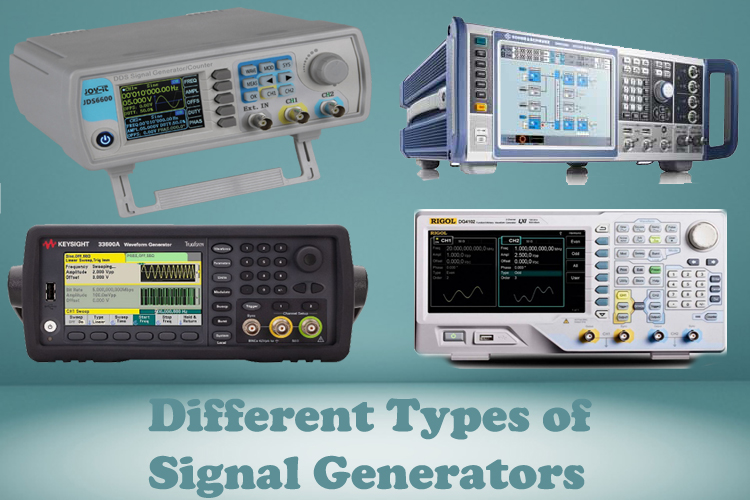
Recently, many waveform generators have become more affordable due to advances in digital technology. Some even combine both functions in one device. USB-powered models are available for laptops, making them portable and easy to use in the field.
Also, software-defined signal generation is becoming popular. You can create, modify, and share waveforms online, making collaboration easier for teams and students. For more on the latest developments, see this Wikipedia article on arbitrary waveform generators.
Credit: circuitdigest.com
Frequently Asked Questions
What Is The Main Difference Between A Function Generator And A Waveform Generator?
A function generator creates basic waveforms like sine, square, and triangle. A waveform generator (especially an AWG) can create any signal shape, including custom patterns and real-world signals.
Can A Function Generator Produce Digital Signals?
Some function generators can create pulses that look like digital signals, but they are mainly for analog testing. For precise digital patterns, a waveform generator is better.
Why Are Waveform Generators More Expensive?
Waveform generators use advanced digital technology, have higher accuracy, and can create complex signals. This makes them more expensive to design and build.
Do I Need A Computer To Use A Waveform Generator?
Many modern waveform generators connect to a computer for designing custom signals. Some can be used alone, but you’ll get the most from them with software control.
Can I Use A Waveform Generator Instead Of A Function Generator?
Yes, a waveform generator can do everything a function generator can and more. But if you don’t need the extra features, a function generator is simpler and cheaper.
Picking the right signal generator can make your testing smoother and results more reliable. Understanding the differences helps you avoid frustration and get the best value for your work.