
When you first look at an oscilloscope, you’ll see two technical terms everywhere: bandwidth and sample rate. If you’re new to using oscilloscopes, these words can feel confusing. But understanding the difference is critical. Without this knowledge, you could make poor measurement choices and miss important details in your signals.
Let’s clear up what these terms really mean, how they work together, and which one matters most in different situations. With the right understanding, you’ll be able to choose the best oscilloscope for your needs and trust the measurements you make.
What Is Oscilloscope Bandwidth?
Bandwidth is one of the most important specifications of any oscilloscope. It tells you the highest frequency the oscilloscope can accurately measure. If the signal you’re testing has frequencies above the oscilloscope’s bandwidth, those parts of the signal will be lost or distorted.
For example, a 100 MHz oscilloscope can measure signals up to 100 megahertz (MHz). If your signal has important details at 200 MHz, a 100 MHz scope will not show them accurately.
Why Bandwidth Matters
- Signal Accuracy: Higher bandwidth means you see more of the true signal. Lower bandwidth hides details.
- Pulse and Edge Measurements: Fast edges (sharp changes) need more bandwidth to display correctly. If you measure a digital clock with steep edges, low bandwidth will make the edges look soft or rounded.
- Measurement Integrity: If the bandwidth is too low, your amplitude and timing measurements will be incorrect.
The “bandwidth Rule Of Thumb”
A common guideline: The oscilloscope bandwidth should be at least 5 times higher than the highest frequency component you want to measure. For example, if you’re working with a 20 MHz clock, choose a scope with at least 100 MHz bandwidth.
What Is Sample Rate?
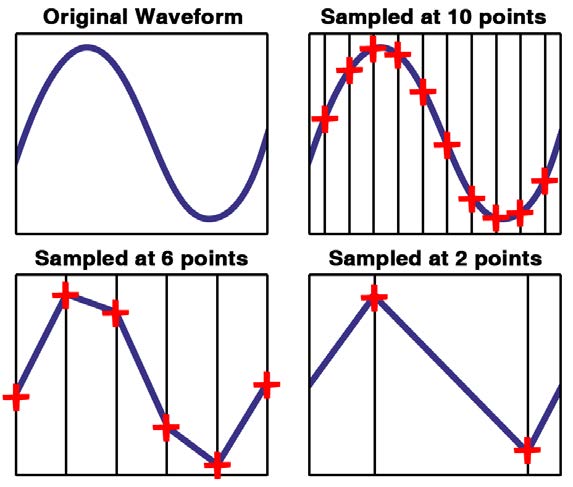
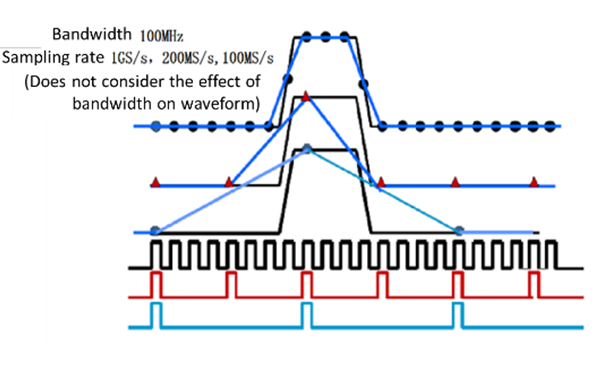
Sample rate is how often the oscilloscope takes a “snapshot” of your signal each second. It’s measured in samples per second (S/s). For instance, a 1 GSa/s (giga-samples per second) oscilloscope samples the signal one billion times per second.
Think of sample rate like a high-speed camera: the more frames you capture per second, the smoother and more accurate your video will be. For oscilloscopes, more samples per second means a more detailed picture of fast-changing signals.
Why Sample Rate Matters
- Signal Detail: If the sample rate is too low, the signal will look blocky, with missing details between points.
- Aliasing Prevention: If you sample too slowly, you could get aliasing—false signals that aren’t really present in your original waveform.
- Accurate Timing: High sample rates let you measure short pulses and fast transitions precisely.
The Nyquist Theorem
To avoid aliasing, you need to sample at least twice the highest frequency in your signal. But in practice, most engineers recommend sampling 10 times higher than your signal’s bandwidth for best results.
Bandwidth Vs Sample Rate: How They Relate
While both terms affect what you see on your oscilloscope, bandwidth and sample rate are not the same. Here’s how they connect and differ:
- Bandwidth is about the oscilloscope’s analog front end—the real-world electronics that receive your signal.
- Sample rate is about the digital part—the speed at which the oscilloscope’s analog-to-digital converter (ADC) captures the signal.
You can have a high bandwidth but a low sample rate, or vice versa. Both must be sufficient for accurate measurement.
Visualizing The Difference
Imagine watching a fast-moving car:
- Bandwidth is like the clarity of your camera lens.
- Sample rate is like how many photos you take per second.
A clear lens (high bandwidth) won’t help if you only take one photo every second (low sample rate)—you’ll miss the action. Taking lots of blurry photos (low bandwidth, high sample rate) also won’t help. You need both.
Typical Specifications: What Do Real Oscilloscopes Offer?
To make this clear, here’s a comparison of common oscilloscope models, showing their bandwidth and sample rate specifications:
| Model | Bandwidth | Sample Rate | Best Use Case |
|---|---|---|---|
| Rigol DS1054Z | 50 MHz | 1 GSa/s | Basic electronics, education |
| Tektronix TBS1202B | 200 MHz | 2 GSa/s | Microcontroller, digital signals |
| Keysight DSOX2024A | 200 MHz | 2 GSa/s | Professional development |
| Rohde & Schwarz RTB2004 | 300 MHz | 2.5 GSa/s | High-speed embedded, RF |
Notice: The sample rate is always much higher than the bandwidth. This ensures you get enough detail to see fast signals clearly.
Credit: www.nutsvolts.com
Common Misunderstandings
Some beginners think a high sample rate alone guarantees good measurements. Others focus only on bandwidth. But both are needed.
- Myth 1: “If the sample rate is high, I don’t need much bandwidth.”
Wrong—without enough bandwidth, the oscilloscope won’t let the fast parts of your signal through.
- Myth 2: “If the bandwidth is high, I don’t need much sample rate.”
Wrong—a high bandwidth with a low sample rate can still miss fast signal changes or show incorrect timing.
Choosing The Right Bandwidth
Selecting oscilloscope bandwidth depends on what you want to measure. Here are practical tips:
- Find the Highest Frequency: Check your signal’s frequency or the fastest rise/fall times. If you’re not sure, err on the high side.
- Apply the 5x Rule: Multiply your highest frequency by 5. This is the minimum bandwidth you should consider.
- Consider Harmonics: Digital signals, like square waves, contain many harmonics. To capture true shape, you need bandwidth for these higher frequencies.
- Don’t Forget Probes: Your oscilloscope probe has its own bandwidth. If the probe’s bandwidth is lower than the oscilloscope, the probe limits your measurement.
For example, if you measure a 10 MHz clock, you want an oscilloscope with at least 50 MHz bandwidth. If you expect sharp edges or high-speed transitions, go higher.
Credit: events.uni-trend.com
Choosing The Right Sample Rate
Once you know your required bandwidth, pick a sample rate at least 5 to 10 times the bandwidth. For most signals, this gives you enough detail to avoid aliasing and see waveforms clearly.
- Minimum for Accuracy: Never go below twice your highest frequency (the Nyquist rate), but for practical use, aim for 10x.
- For Pulse and Glitch Detection: If you need to catch tiny glitches or short pulses, higher sample rates help. Some scopes offer “peak detect” or “equivalent time sampling” for this.
- Record Length Matters: Sample rate affects how much data you can store. Higher sample rates fill up memory faster, limiting how much of the signal you can see at once.
For a 100 MHz signal, a 1 GSa/s sample rate is a good starting point. More is better if your oscilloscope allows.
Real-world Example: Digital Signal Testing
Suppose you need to measure a microcontroller’s clock at 16 MHz. The clock signal is a square wave, so it contains many harmonics.
- Bandwidth: Using the 5x rule, 16 MHz × 5 = 80 MHz. So, you should use at least an 80 MHz oscilloscope.
- Sample Rate: For best detail, 80 MHz × 10 = 800 MSa/s (mega-samples per second).
If you use a 20 MHz bandwidth oscilloscope with a 1 GSa/s sample rate, your scope will sample frequently, but the analog bandwidth will filter out most harmonics. The result: the signal looks rounded, not square.
If you use a 100 MHz bandwidth, 1 GSa/s scope, you’ll see the real square wave shape, including the fast edges.
Table: Bandwidth And Sample Rate Pairings
Here’s a quick reference for common signal frequencies and recommended oscilloscope specs:
| Signal Frequency | Recommended Bandwidth | Recommended Sample Rate |
|---|---|---|
| 1 MHz | 5–20 MHz | 20–100 MSa/s |
| 10 MHz | 50–100 MHz | 100–500 MSa/s |
| 100 MHz | 500 MHz–1 GHz | 1–5 GSa/s |
| 500 MHz | 2.5 GHz+ | 10+ GSa/s |
What Happens If You Choose Poorly?
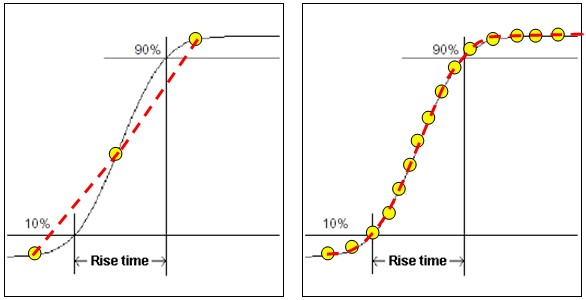
- Bandwidth Too Low: Your signal looks “soft.” Fast edges are missing, and high-frequency noise is invisible. You might think your circuit is fine when it’s not.
- Sample Rate Too Low: Parts of your signal are missing or look wrong. Aliasing can create false signals that weren’t there in the first place.
- Both Too Low: You’ll see a signal, but it’s not trustworthy for serious work.
A hidden pitfall: sometimes the oscilloscope’s sample rate drops at wider timebases (when you view longer signals). Always check the sample rate at your chosen time setting.
Credit: www.ni.com
Non-obvious Insights For Beginners
- Bandwidth Is a Hardware Limit: You can’t “turn up” bandwidth with software. If your oscilloscope is 100 MHz, you cannot measure 200 MHz accurately, no matter what the display shows.
- Sample Rate Drops With More Channels: On many oscilloscopes, the maximum sample rate is only available when using one channel. Turn on more channels, and the sample rate per channel drops—sometimes by half or more. Always check your scope’s manual.
- Record Length Affects Detail: Some scopes let you adjust “record length”—how many samples are stored. Longer record length keeps high detail over more time, but also fills up memory faster.
How To Balance Bandwidth And Sample Rate For Your Needs
- For most electronics work (up to 20 MHz signals), a 100 MHz oscilloscope with 1 GSa/s is usually enough.
- For high-speed digital (like USB, DDR memory), you may need 500 MHz to several GHz bandwidth and much higher sample rates.
- For audio or power electronics, even 20 MHz bandwidth and 100 MSa/s sample rate might be more than enough.
If you’re not sure, start with higher specs. You can always use a high-bandwidth scope for lower-frequency signals, but not the other way around.
Data Table: Harmonics And Bandwidth Needs
To see a digital square wave clearly, you need to capture its harmonics. Here’s how many you need for different signal “sharpness”:
| Harmonics Captured | Needed Bandwidth (for 10 MHz signal) | Result |
|---|---|---|
| Fundamental only (1x) | 10 MHz | Sine wave, no edges |
| 3rd Harmonic | 30 MHz | Basic square shape |
| 5th Harmonic | 50 MHz | Sharper edges |
| 10th Harmonic | 100 MHz | Very sharp edges |
Key tip: To see sharp digital edges, your oscilloscope bandwidth must be high enough to capture several harmonics, not just the base frequency.
Where To Learn More
For deeper reading on oscilloscopes, their specifications, and measurement techniques, the Wikipedia Oscilloscope page is an excellent resource.
Frequently Asked Questions
What Is More Important: Bandwidth Or Sample Rate?
Both are critical, but bandwidth is usually the first thing to check. If the analog bandwidth is too low, you won’t see fast edges or high frequencies, even if you have a high sample rate. Once you have enough bandwidth, make sure your sample rate is at least 5–10 times higher than the bandwidth.
Can I Measure A 100 Mhz Signal With A 100 Mhz Bandwidth Oscilloscope?
You can, but the measurement will not be perfect. Most scopes start to lose accuracy near their rated bandwidth. For reliable results, your oscilloscope’s bandwidth should be at least 1. 5 to 2 times higher than your signal’s frequency.
What Happens If My Sample Rate Is Too Low?
If your sample rate is too low, you’ll get “aliasing.” The waveform may look different from the real signal—sometimes showing extra waves or missing features. Always sample at least 10 times your signal frequency for best results.
Does Using More Channels Reduce The Sample Rate?
On most digital oscilloscopes, yes. The maximum sample rate is often split among active channels. Check your oscilloscope’s specifications to see how this works. For best detail, use fewer channels if possible.
How Do Probes Affect Bandwidth?
Oscilloscope probes have their own bandwidth limits. A low-bandwidth probe will filter out high-frequency details, even if your oscilloscope has high bandwidth. Always match your probe’s bandwidth to your oscilloscope for accurate measurements.
Understanding the difference between oscilloscope bandwidth and sample rate helps you choose the right tool and trust your results. With this knowledge, you’ll avoid common mistakes and get the most from your measurements—whether you’re debugging a microcontroller or analyzing high-speed signals.